
AI
Redesign a Room with ChatGPT: From Photo to Shopping List
Use a room photo to explore a realistic refresh, keep the furniture you own and build a shopping list around measurements and budget. Includes copyable prompts.

A living room can feel unfinished without an obvious reason. The sofa is still comfortable, the table fits, yet the rug, lighting and colors do not quite work together. A photo gives you a way to describe the problem and explore a few changes before spending money.
In this guide, I separate two tasks: creating a visual concept, then checking how to approach that look with real products and a defined budget. A picture can establish a direction. The shopping list also needs to work for your measurements, local availability and costs.
How do you redesign a room with ChatGPT?
Attach a clear room photo, specify what stays and request a redesign that preserves the architecture. After choosing a direction, ask for a product search with dimensions, links and a running total. ChatGPT supports generating and editing images using a reference image; availability and usage limits depend on the account and workspace. OpenAI’s image generation documentation.
The result is not a measured plan. Even when you ask to preserve windows and proportions, compare the result with the original and measure the space before buying furniture. OpenAI notes limitations in precise spatial reasoning from images. Image analysis limitations.
Before uploading: prepare the photo and constraints
Take a normal eye-level photo in daylight from an angle showing most of the room. A second view can reveal hidden areas. Prefer a regular photo to a panorama that distorts the walls.
Include the room’s measured width and length, dimensions of furniture you are keeping, door locations and the problem you want to solve. If measurements are missing, say so and ask ChatGPT not to promise a fit.
Clear enough clutter to show the floor and furniture, and hide documents or personal details unrelated to the design. Attach the photo using the option available in your interface and explain its purpose. Working with image inputs.
Decide what stays
“Keep the furniture” and “replace the furniture” can conflict. Name what stays, what may move and what may be replaced. For example: keep the sofa and coffee table; add a rug, floor lamp, cushions and a plant.
Prompt 1: Redesign the room while preserving its structure
Upload the photo and replace the bracketed details:
The attached photo shows the room I want to refresh: [living room/bedroom].
My measured dimensions: [room and main furniture dimensions, or say they are not available yet].
Preserve the room shape, walls, windows, doors, floor and fixed lighting locations shown in the photo.
I am keeping [furniture list]. Do not replace these pieces or change their dimensions in the image.
You may move [list], and add or replace only [list].
The goal is [for example: a warm living room suitable for reading], using calm colors and a warm modern style.
Create one realistic photographic visualization from the same camera angle and proportions, with natural light and convincing textures.
Do not enlarge the room, add a window or hide an opening to improve the result.
Ask before generating if essential information is missing. Use my supplied measurements; do not invent measurements from the photo.
Start with one version and check the structure before requesting more. If you receive text only, explicitly ask to “generate an image based on the attached photo.” If image generation is unavailable, request a written proposal and return to the visual when the tool is available.
Visual example: From reference to redesign
Both images here were generated with AI for this explanation. The first is an example room, and the second was created by editing it. They do not document a client’s home, a completed renovation or a verified budget.
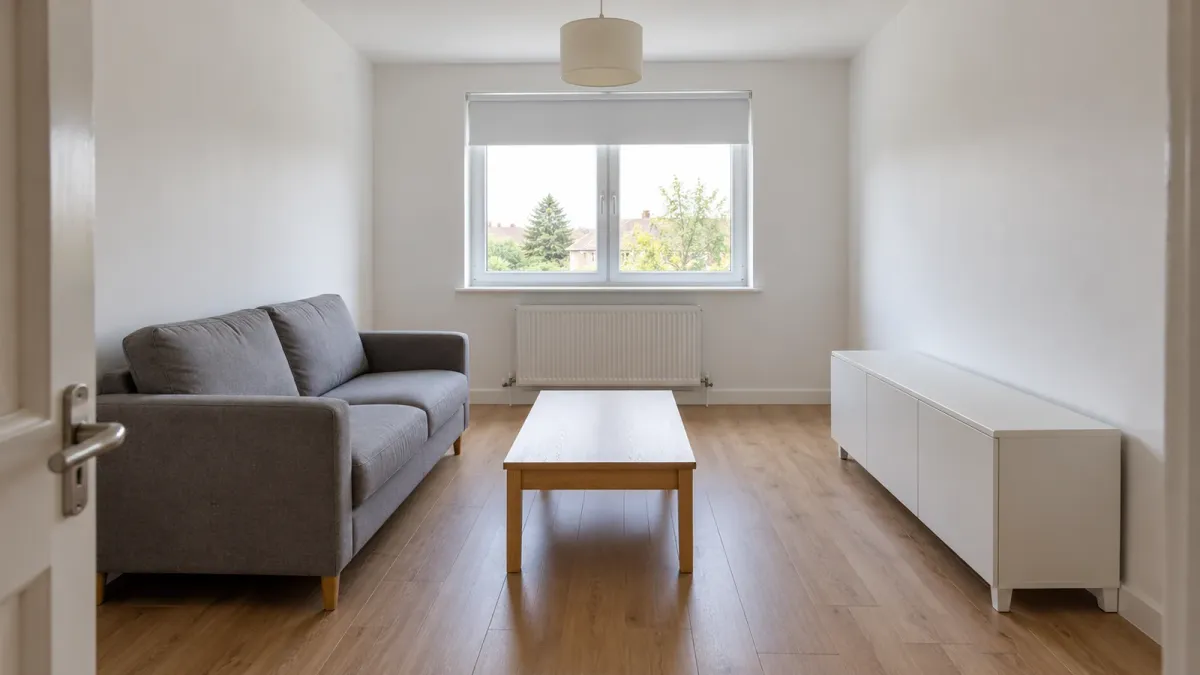
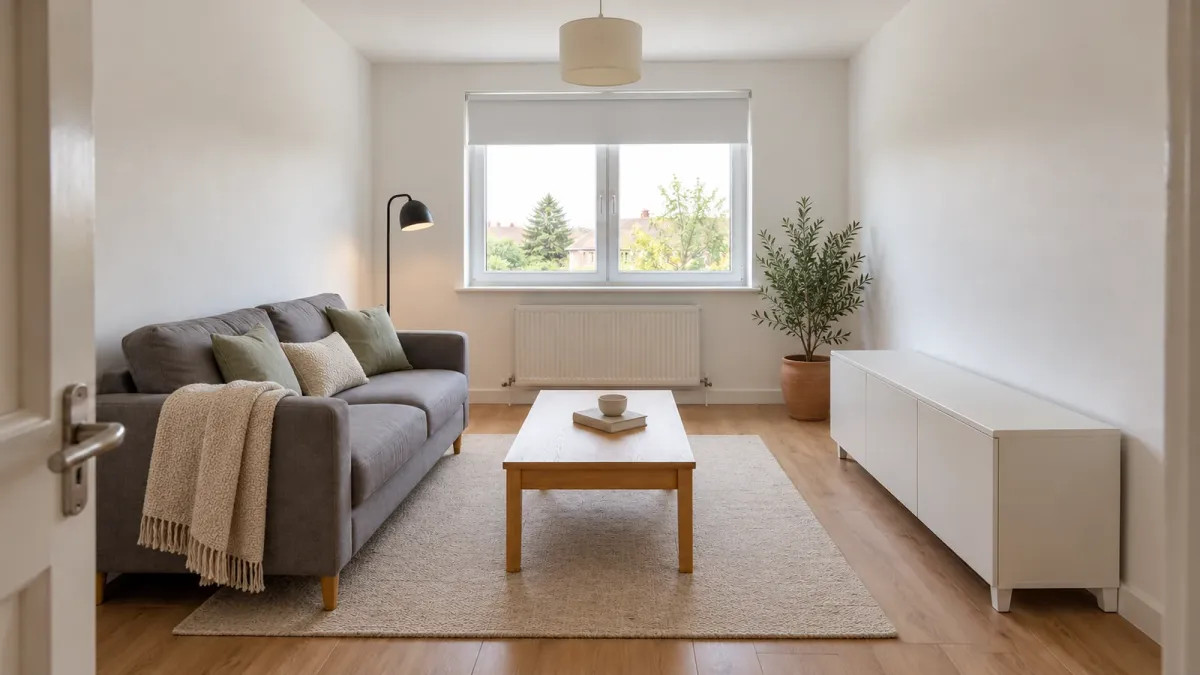
The example keeps the gray sofa, oak coffee table and existing room structure. The changes focus on additions such as textiles, a rug and lighting. When reviewing your own result, first compare window placement, wall boundaries and the pieces you asked to retain.
Prompt 2: Build a shopping list within your budget
Continue in the same chat and identify the version you chose. For this step, ask for current web search with sources. You do not need a specific globe icon, whose placement varies between interfaces. ChatGPT web search.
I choose visualization [identify it]. Build a shopping list to approach that look within a total budget of [for example, $500].
Shop for [country/city], using [currency], from stores delivering to that destination.
I already own and am keeping [list]. Do not include buying these pieces again.
Use current web search and open real product pages. Do not invent links, prices or availability.
For each item, list its role in the design, product name, store, dimensions, color, quantity, unit price and direct link.
Show line totals and a running total. Include known delivery costs and other charges, with the date checked.
If shipping or tax is unknown, mark the total incomplete and retain a reserve. Do not claim the budget is verified.
Distinguish a product found for purchase from a close visual alternative. Do not assume every generated object has an identical retail product.
Rank items as essential or deferrable. If the budget is insufficient, reduce the proposal and explain what is omitted.
Do not buy, register or contact a store on my behalf. Return a table in English and the measurements I need to check before ordering.
Open each link and check the product, size and color. Watch for missing components: a lampshade without a lamp, cushion covers without inserts or a planter without a plant can change the cost.
An illustrative $500 allocation
These numbers are a planning example, not checked retail prices or offers from a particular store. The budget refreshes a room around existing furniture; it does not include a new sofa or bed.
| Category | Example allocation | Running total |
|---|---|---|
| Rug | $150 | $150 |
| Cushions and throw | $80 | $230 |
| Floor lamp | $90 | $320 |
| Plant and planter | $30 | $350 |
| Delivery and other charges | $50 | $400 |
| Reserve | $100 | $500 |
If a main item costs more than its allocation, defer another addition. You do not have to finish the whole room in one order.
Four more prompts to keep
3. Design around furniture you own
Return to the original photo. I am keeping [sofa/bed/rug] in its existing size and color.
Build the design around it and suggest only additions that improve [the goal].
Explain what can stay as it is and what could move without changing the architecture.
Generate one image from the same camera angle.
4. Compare styles in the same room
I want to compare this room in three styles: warm modern, Japandi and mid-century.
Use the original photo and the same furniture I specified keeping.
Preserve the architecture, camera angle and stated budget for additions across the versions.
Start with one warm modern version. After I confirm the structure is preserved, we will create the other styles separately.
Show differences through materials, colors and lighting without adding floor area or replacing retained furniture.
The same viewpoint makes styles easier to compare. Three rooms with different dimensions do not provide a useful basis for choosing.
5. Explore wall paint colors
Suggest three wall-color directions suited to this design and the retained furniture, with a short explanation for each.
If you name a manufacturer’s paint color or code, verify it in the official catalog available in [country] and link to it.
Do not present a color sampled from the image as an exact match for a real wall paint.
Separate a color description from a verified paint product. Explain what to check using a physical sample in the room in daylight and evening light.
Before buying a full quantity, test a physical sample on the actual surface under your lighting. A rendered image and a screen cannot replace that check.
6. Adapt the design for a rental
Adapt this design for a rental: no painting, drilling, floor replacement or permanent changes.
Keep the furniture I marked and the budget of [amount and currency].
Prefer textiles, a rug, a floor lamp and accessories that can be placed and removed.
If suggesting adhesive or wall attachments, say that surface suitability, removal instructions and permission under the rental terms need checking. Do not promise damage-free removal.
Create one photographic-looking version and a prioritized list of changes.
When the result stops looking like your room
If a window moves, the space grows or your sofa changes, return to the original photo and request a focused correction. OpenAI recommends specifying what changes and what stays, then making small revisions. Focused image editing.
Return to my original attached image. The last visualization changed [describe the problem].
Correct only this: [requested correction].
Preserve the walls, windows, retained furniture, camera angle and lighting as specified.
Make no other changes. If a detail cannot be preserved precisely, explain that instead of calling the result exact.
If it looks like a 3D render, request natural light, realistic fabric and wood textures, and consistent shadows. For a wrong shopping link, provide the product name and ask for a checked direct product page. If the list exceeds the budget, start by replacing the most expensive item or deferring a nonessential addition.
What to check before buying furniture
| In the visualization | In the actual room |
|---|---|
| A rug looks right beside the sofa | Measured rug size and placement on the floor |
| A cabinet fits an alcove | Width, depth, door opening and access |
| A lamp stands in a convenient spot | Dimensions, available outlet and included components |
| A color suits the room | A physical sample under the existing light |
| A list fits the budget | Current price, quantity, delivery and other charges |
Frequently asked questions
Can ChatGPT measure a room from a photo?
Do not treat a visual estimate as a precise measurement. Supply measurements you took and check the fit in the room, especially before buying large furniture. Spatial reasoning limitations.
Can I keep my sofa or bed?
Yes. Name them as pieces that must stay and request changes to textiles, lighting and accessories. Check that the image actually retains them before moving to the shopping list.
Can the whole redesign cost under $500?
That depends on what you own and what needs buying. It can be a planning target for a refresh, but it is not a promise to furnish a whole room. Verify prices and delivery for your country and actual cart.
Do I need a particular plan or an API?
This guide uses image generation and editing inside ChatGPT when available to the account. Limits depend on the subscription and environment. API use is a separate route and is not required to attach a photo in a chat. Image generation availability.
Are the objects in the visualization real products?
Not necessarily. Ask for similar products through current search, with a clear distinction between a close alternative and an item found for purchase. Verify every link and dimension before ordering.
Start with one room
Choose a room, take a photo and list the furniture you are keeping. Once one visualization preserves the structure, create a short list of additions and check dimensions and total cost. Your next purchase can then be a specific item that fits, with a clear place for it in the room.
For more ways to work with images, visit the ChatGPT image and video shortcuts guide.
Keep it for later
Take the guide with you
Save the complete guide to read and annotate offline, or print a copy to keep beside you while you work.
Keep reading

GuideAI
200 ChatGPT image and video shortcuts: my workflow
200 short requests for portraits, products, ads, branding and video. My guide covers defining shortcuts, using references and connecting Higgsfield.

GuideAI
Find Discount Codes with ChatGPT: Search, Test and Compare
Two prompts to find coupon candidates and test them in your cart, plus five follow-ups for offers and prices. Compare totals and handle payment yourself.

ArticleAI
I Tested the Mystery "Ox Alpha" Model for a Day — Here's What I Found
Hands-on first look at Ox Alpha, a mystery stealth model on OpenRouter - games, 3D models, and photo-to-3D tests, plus what's actually confirmed about it.