
AI
200 ChatGPT image and video shortcuts: my workflow
200 short requests for portraits, products, ads, branding and video. My guide covers defining shortcuts, using references and connecting Higgsfield.

In my experiment with AI images and video, I worked with short requests I could return to: a profile portrait, a product image, an ad or a clip. This guide collects 200 shortcuts with a clear meaning for each, so you can choose a direction and add the details of your own project.
These are names for requests, rather than official ChatGPT commands. To make a shortcut such as /headshot consistent, define its meaning in the conversation. Image generation depends on the tools available in your account. Video needs a connected video tool, such as Higgsfield, and an eligible account.
How to use a shortcut without guessing its meaning
Choose a row, copy the shortcut and its description, then add a subject, reference and details. For example: /productshot: a studio image of the attached bottle, white background, square format. Preserve the label and packaging shape.
For repeated work, define a few shortcuts at the start of a conversation. You do not need all 200 at once:
In this conversation I will use personal shortcuts for image and video requests. They are not system commands. Use the meanings I define here:

/headshot = a professional portrait using a face photo I attach.
/productshot = a studio product image on a clean backdrop.
/staticad = a static ad using a message and text I supply.
/productreel = a vertical product video using my reference and instructions.

If I introduce another shortcut, I will send its meaning. Ask about a missing detail only if it changes the result. Preserve the person's identity, the product shape and supplied text. Do not invent features, prices, testimonials or results.

Use a generation tool available in this conversation. Before a credit-consuming action, state the tool and cost if it can be checked. If no suitable tool is available, say so and prepare a prompt for an external tool. Do not present a script or description as a generated file.
The shortcut does not replace a brief. For portraits, attach a clear face image. For products, supply a photo showing the label and proportions. Without a reference, describe what should appear and what must remain accurate.
OpenAI describes image creation through ordinary prompts or the image tool, where available, and editing uploaded images. ChatGPT image instructions.
What do you get: an image, mockup, diagram or video?
Most entries describe image directions. A mockup is a visualization. A 3D-looking illustration is not necessarily an editable model. /vectorflat describes an appearance; if you need SVG, print artwork or a 3D file, specify the format and check that the tool can deliver it.
Video requests include /ugc, /productspin and /animated in the opening group, plus 16 entries in the video section. They name the kind of clip you want. Duration, resolution, aspect ratio and audio support depend on the tool and model.
Connect Higgsfield to ChatGPT
Open Higgsfield's official connection page. If the plugin is available in your account, add it, sign in to Higgsfield and authorize the connection. Start a new conversation and explicitly request the tool. Official connection instructions.
The documentation states that an active subscription is required. Check eligibility and your balance before generating. Connected generation consumes credits; Unlimited access on the Higgsfield website does not make external-tool generation credit-free. Higgsfield's connected-tool credit explanation.
Connecting the plugin does not turn these 200 aliases into its commands. Describe the request, specify the tool and check the chosen model. This guide does not promise automatic selection of the best model or better results for every task.
If authorization fails, check the connection and whether the tool is available in the conversation. If images work but video does not, inspect the error, model availability, plan eligibility and credits. A general error does not establish that credits are exhausted.
A brief that preserves the details you need
I use a shortcut to return to a type of work, then specify the details that matter. For a portrait:
/headshot: Create a professional portrait from my attached photo. Preserve facial features, age, glasses and skin tone. Use soft window light, a simple light backdrop and a chest-up crop. Do not reshape the face. Provide a square image that also works in a circular crop.For a product:
/productshot: Create a studio image of the attached product on white. Preserve its shape, proportions, colour and label. Do not add components or text. Use a square format with space around the product. If a label detail is unreadable in the reference, do not invent it.For video, after connecting an eligible tool:
/productreel: Use Higgsfield for a vertical product video based on the attached image. First propose a model, duration, aspect ratio and credit estimate where available. Use a slow camera push-in and preserve the product. Do not add text, audio or product claims unless I supply them. If video generation is unavailable in this conversation, provide a prompt to copy and state that no clip was generated.Three examples: a collectible figure, an exploded product and packaging
These shortcuts demonstrate different outputs you can request from the library. Each example includes a full prompt and an image generated with OpenAI's image tool for this guide. The products are fictional; these are not Higgsfield results or records of the original experiment.
/actionfigure: turn a reference person into a collectible figure
Use this for a personal content idea, a gift concept or character design. Attach a face photograph and change the output into a toy while asking to retain recognizable features.
/actionfigure: Turn the person in the attached photograph into a collectible action figure inside a box with a transparent window. Keep the bald head, black glasses, beard and light blue shirt recognizable as a sculpted toy. Show the full figure with dark trousers and white shoes. Add a miniature laptop and game controller in separate compartments. Navy packaging with lime accents, studio lighting, square format and the entire box visible. No text or logos.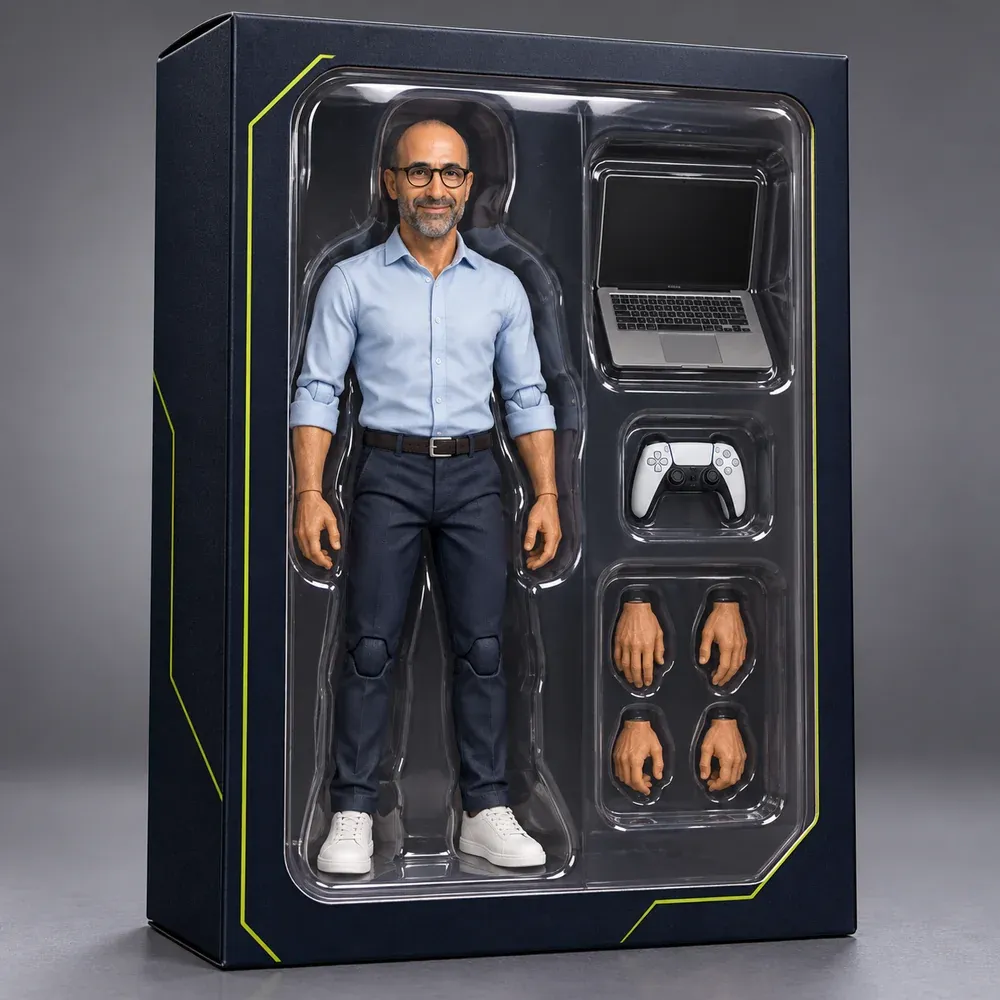
Check recognizability, toy-like anatomy, accessories and the arrangement of packaging compartments. This output is a visual concept, not a production-ready toy model.
/productexplosion: show a product as separated components
This request creates a component illustration for a presentation or creative concept. Here, fictional headphones have one earcup's layers separated along a clear axis.
/productexplosion: Create a conceptual exploded image of fictional navy over-ear headphones with teal accents. Keep the headband and left earcup connected. On the right, space these layers clearly apart: ear cushion, outer shell, speaker disc, simple circuit board and inner housing. Preserve a recognizable headphone silhouette and orderly spacing. Light studio backdrop, crisp materials, square format. No labels, dimensions, text or technical specifications.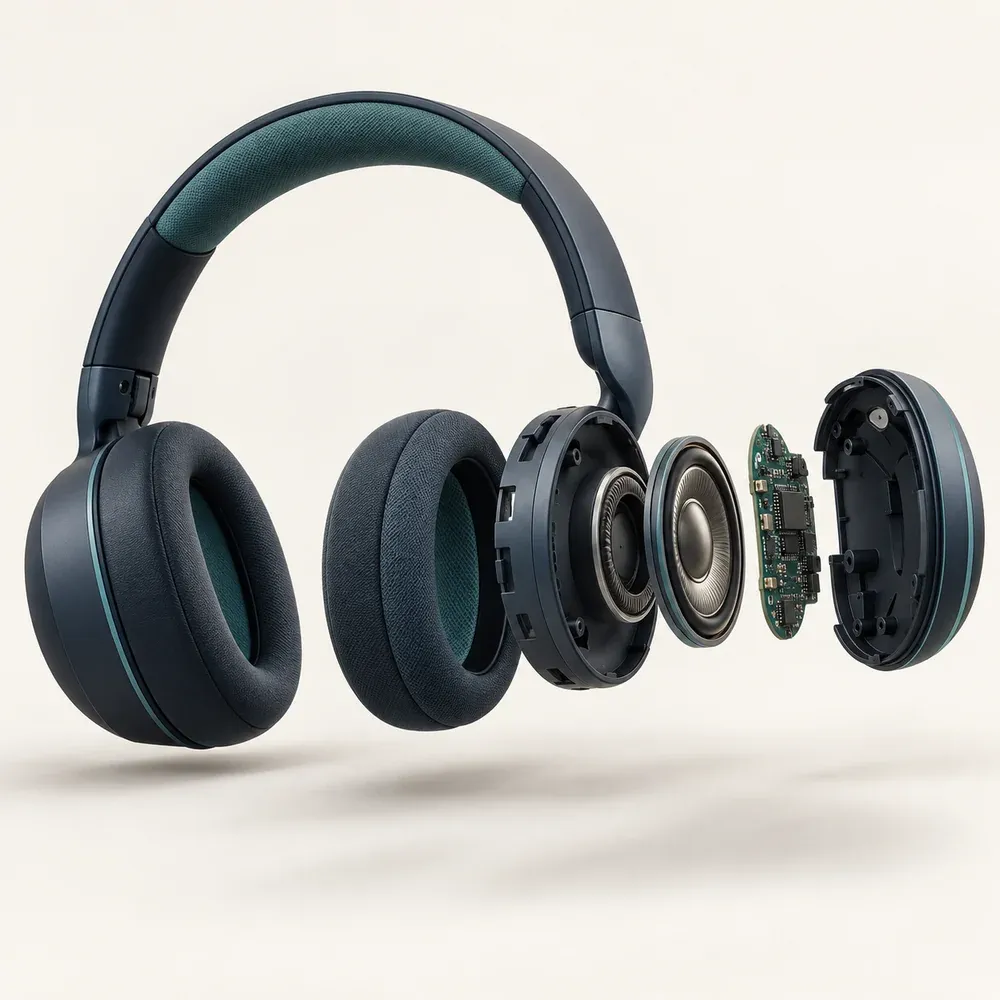
This is an artistic interpretation of a possible structure. For an actual product, provide a verified parts list or drawing and check the illustration against it. The generated image does not establish how real headphones are built.
/packagingdesign: develop a coordinated gift set
This example shows open and closed packaging, fitted compartments and coordinated contents. It helps explore a visual direction before producing manufacturing artwork.
/packagingdesign: Design a fictional coffee gift set. Use a rigid navy box, ivory interior and teal band with a simple leaf symbol without letters. In fitted compartments, place two ivory-and-teal coffee pouches and a dark espresso cup. Add a matching closed box behind it to show the exterior. Three-quarter product photograph on pale stone, square format. No brand name, text, price or existing logo.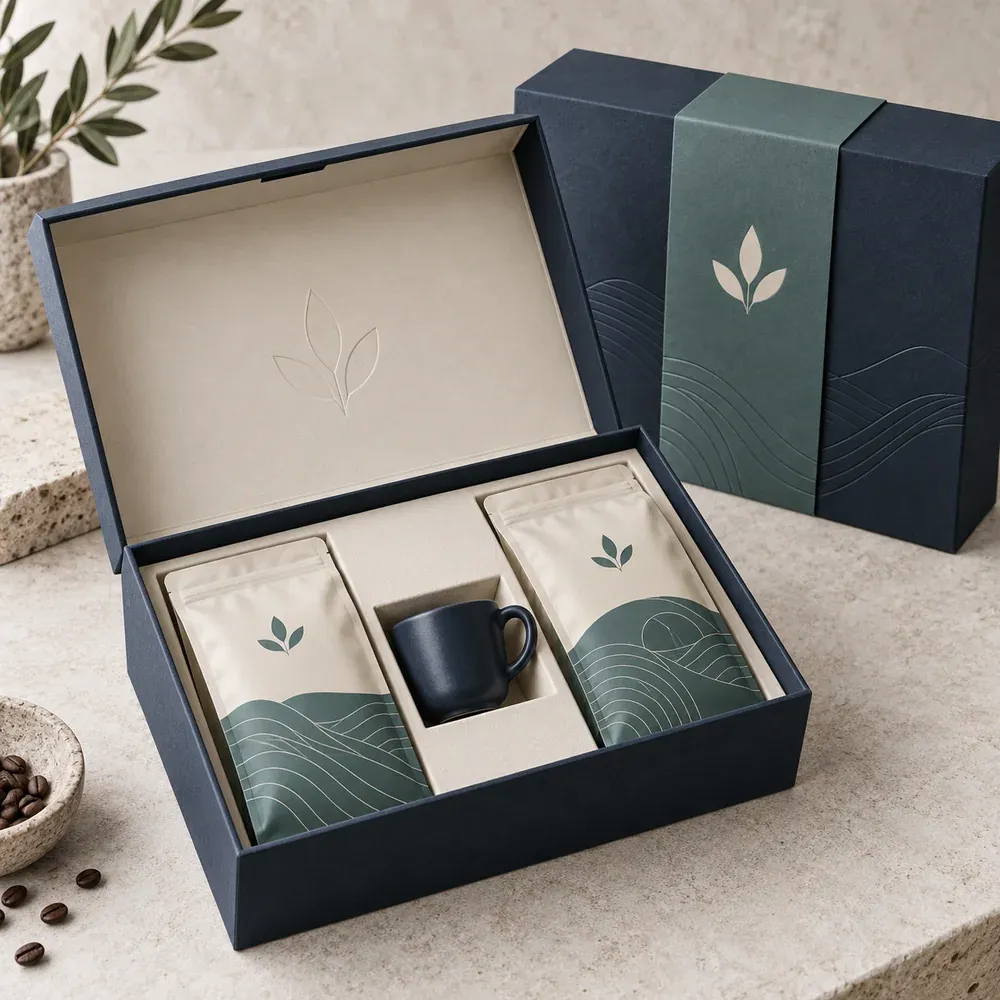
Check colour consistency, compartment layout and space for the product information you need. This image does not include a dieline, dimensions or print file; prepare and verify those separately.
Copy a prompt as written or change its subject and colours. The opening alias shortens a request; it is not an official system command.
The 200-shortcut library
Each row describes a request direction. Copy the shortcut with its meaning, add details and inspect the output. Use Ctrl+F to find a shortcut on the page.
Official documents, commerce, property listings and technical drawings need additional checks. /passportphoto does not guarantee acceptance, /amazonready does not certify policy compliance, and a cutaway or dimensioned illustration is not verified engineering information. Use concepts as concepts, and preserve facts when presenting an actual product, property or service.
Six shortcuts to start with (6)
| Shortcut | What to request |
|---|---|
/headshot | A professional portrait using a face reference |
/ugc | A creator-style product demonstration video |
/productexplosion | A conceptual exploded product image |
/productspin | A product rotation video |
/adcreative | An advertising concept built around a product |
/animated | An animation of a product or object |
Portraits and profile images (18)
| Shortcut | What to request |
|---|---|
/corporateheadshot | A studio portrait against a grey background |
/passportphoto | A white-background portrait draft to check against official requirements |
/casualheadshot | A casual portrait with window lighting |
/graduationportrait | A portrait in graduation attire |
/founderportrait | An editorial portrait for a founder or business owner |
/actorheadshot | A casting-style portrait with direct eye contact |
/teamphoto | A consistent visual style for team portraits |
/doctorportrait | A medical-setting portrait consistent with the person's actual role |
/bwportrait | A monochrome portrait with photographic texture |
/realtorheadshot | A real-estate agent portrait in a residential setting |
/goldenhourportrait | An outdoor portrait in warm late-day light |
/fitnessportrait | A training-setting portrait with side lighting |
/speakerphoto | A conceptual stage portrait, without claiming the event occurred |
/podcastportrait | A microphone portrait for an audio show |
/authorphoto | An author portrait for a biography or book jacket |
/vintageportrait | A portrait with a vintage film treatment |
/datingprofile | A natural profile portrait preserving the person's appearance |
/outfitswap | Several clothing options for the same portrait |
Product images (20)
| Shortcut | What to request |
|---|---|
/productshot | A product in studio lighting on a clean backdrop |
/ghostmannequin | A garment image without a visible mannequin or model |
/lifestyleshot | A product in a specified usage scene |
/handheld | A hand-held product image to suggest scale |
/heroimage | A wide product image with space for a headline |
/naturebackdrop | A product in a chosen natural setting |
/flatlay | An overhead product and accessory arrangement |
/podiumshot | A product on a raised display surface |
/floatingproduct | A floating product with a corresponding shadow |
/glassreflection | A product on reflective glass |
/splashshot | A product with a frozen liquid splash |
/backgroundswap | A background change that preserves the product |
/macroshot | A close-up of a material, finish or detail |
/catalogset | A product series with consistent lighting and composition |
/luxuryshot | An editorial product treatment with chosen materials |
/beforeafterproduct | A before-and-after layout using actual evidence |
/colorways | Colour variants of the same product |
/seasonalshot | A product scene for a specified season or occasion |
/onmodel | A garment visualized on a model |
/amazonready | A commerce image draft to check against Amazon's current policy |
Product concepts and 3D visuals (14)
| Shortcut | What to request |
|---|---|
/exploded3d | An exploded visual with supplied component labels |
/blueprintview | A blueprint-style illustration using supplied dimensions only |
/cutaway | A cutaway illustration based on a known structure |
/miniature | A miniature product model on a desk |
/xrayview | A transparent conceptual view of a supplied internal structure |
/giantscale | An oversized product in a setting |
/clayrender | A grey render emphasizing form |
/partslist | A visual arrangement of known components |
/wireframerender | A wireframe-style product illustration |
/materialswap | The same design visualized in different materials |
/turntable | A sheet of product views from different angles |
/assemblysteps | Assembly panels based on supplied instructions |
/isometricproduct | An isometric product illustration |
/insidethebox | A layout of the supplied package contents |
Ads and marketing visuals (18)
| Shortcut | What to request |
|---|---|
/staticad | A static ad with a specified message and action |
/offerad | An ad for an actual offer and supplied terms |
/storyad | A vertical story-format ad |
/retargetad | A reminder creative for a familiar product |
/carouselad | A carousel with one idea per slide |
/adset | Ad variants with different creative angles |
/bannerad | A creative adapted to supplied banner dimensions |
/emailheader | An image for the top of an email |
/billboard | An ad mocked up on a billboard |
/landingmock | A visual concept for the top of a landing page |
/busstopad | An ad visualized at a bus stop |
/appstoreshots | Store screenshot drafts based on actual app screens |
/magazinead | A magazine-page ad concept |
/subwayad | An advertising poster in a railway setting |
/comparisonad | A visual comparison using verified differences |
/uglyad | An ad with a deliberately informal visual style |
/testimonialad | An ad using an authorized, genuine testimonial |
/adstoryboard | A storyboard for an advertising video |
Branding and logo concepts (16)
| Shortcut | What to request |
|---|---|
/logoconcepts | Several initial directions for a brand mark |
/letterhead | A letterhead and envelope concept |
/wordmark | A name-based logo concept |
/brandmerch | Brand mockups on merchandise |
/iconlogo | A symbol-only mark concept |
/storefront | Branding visualized on a shop front |
/mascotdesign | An illustrated brand character |
/appicon | App icon concepts |
/brandboard | A visual identity direction board |
/favicon | A small icon draft to test legibility |
/colorpalette | A colour palette with codes to verify |
/monogram | A mark based on initials |
/patterndesign | A repeating visual pattern |
/logomotion | Key frames for planning logo motion |
/businesscard | A two-sided business card mockup |
/rebrand | Update directions for an existing identity |
Social graphics (18)
| Shortcut | What to request |
|---|---|
/thumbnailimage | A video thumbnail with a clear focal point |
/tiktokcover | A vertical short-video cover |
/carouselcover | An opening carousel slide |
/memeformat | An idea presented as a meme |
/quotecard | A quote card using supplied text |
/announcementpost | A graphic for an actual announcement |
/instagrid | A visual plan for nine posts |
/eventflyer | A flyer using supplied event details |
/storycover | Icons for highlight covers |
/countdownpost | A countdown series for an actual date |
/linkedinbanner | A banner using specified LinkedIn dimensions |
/statgraphic | A graphic for a supplied, sourced figure |
/youtubebanner | A channel banner with a text-safe area |
/podcastcover | A square cover for a podcast |
/twitterheader | A profile header concept for X |
/profilepic | A profile image designed for small crops |
/pinterestpin | A tall graphic with a chosen title |
/reelcover | A video cover matching an account's visual style |
Mockups and packaging (14)
| Shortcut | What to request |
|---|---|
/packagingdesign | A product packaging concept |
/laptopmockup | An actual screen visualized on a laptop |
/boxmockup | A design mocked up on a box |
/tshirtmockup | A design visualized on a T-shirt |
/bottlelabel | A label visualized on a bottle or jar |
/postermockup | A framed poster visualized on a wall |
/bagmockup | Branding visualized on a bag or pouch |
/menudesign | A menu design using supplied items |
/canmockup | A label visualized on a can |
/shelfshot | A product visualized on a shop shelf |
/bookcover | A cover direction for a book or guide |
/giftbox | A gift-box presentation concept |
/phonemockup | An actual screen visualized on a phone |
/stickersheet | A sticker sheet using brand elements |
Food, spaces and property concepts (14)
| Shortcut | What to request |
|---|---|
/foodshot | A dish image based on supplied ingredients and description |
/floorplan3d | A 3D visualization of a supplied floor plan |
/menuphoto | An overhead dish image for a menu |
/gardenplan | A visual direction for a garden |
/drinkshot | A drink image with chosen lighting and details |
/kitchenreno | A concept for kitchen cabinet and counter changes |
/recipecard | A recipe card using supplied instructions |
/listingphoto | A room-photo edit preserving its actual structure |
/roomredesign | A room redesign concept in a chosen style |
/officespace | A workspace design concept |
/virtualstaging | Furniture visualized in an empty room |
/nightshot | A building visualized in evening light |
/exteriorrender | A house exterior concept |
/moodboard | An inspiration board for a project or space |
Illustration and art treatments (18)
| Shortcut | What to request |
|---|---|
/watercolor | A watercolor treatment of a subject |
/stainedglass | A stained-glass treatment |
/oilpainting | An oil-painting treatment |
/tattoodesign | A tattoo concept to review with an artist |
/pixelart | A pixel-art treatment |
/childrensbook | A children's-book illustration treatment |
/lineart | A black-ink line illustration |
/graffiti | A word or symbol with a graffiti treatment |
/popart | A pop-art treatment with flat colours and dots |
/vectorflat | A flat vector-style illustration, not a guaranteed vector file |
/anime | An anime-style illustration |
/sketchbook | A pencil sketch with shading |
/cartoonme | A cartoon interpretation of the reference person |
/lowpoly | A geometric low-poly visual |
/3dcharacter | A stylized 3D character interpretation |
/claymation | A clay-figure visual treatment |
/papercut | A layered paper-cut treatment |
/embroidery | A design visualized as embroidery |
Infographics and explanatory visuals (14)
| Shortcut | What to request |
|---|---|
/infographic | An infographic using supplied information |
/orgchart | An organization chart using a supplied structure |
/processdiagram | A diagram of a specified process |
/roadmapgraphic | A visual timeline of a supplied work plan |
/comparisonchart | A comparison chart using supplied data |
/pricingtable | A visual layout of actual plans and prices |
/statposter | A poster of sourced figures |
/checklistgraphic | A printable visual checklist |
/timelineposter | A timeline of supplied events |
/howtoillustration | Illustrated steps for a task |
/iconset | An icon set with a consistent visual style |
/anatomyof | A labelled breakdown using supplied components |
/mapgraphic | A map illustration using supplied locations |
/slidevisual | A visual for a slide's central idea |
Personal and playful concepts (14)
| Shortcut | What to request |
|---|---|
/actionfigure | A boxed collectible figure based on a reference |
/superhero | An original superhero interpretation of a reference |
/movieposter | A fictional film poster featuring the reference person |
/babyphoto | A birth-announcement card using a supplied image |
/magazinecover | A fictional editorial cover featuring the reference person |
/weddinginvite | An invitation using supplied wedding details |
/tradingcard | A collectible card with chosen details |
/holidaycard | A holiday card using a supplied family image |
/petportrait | An illustrated pet portrait |
/caricature | A caricature based on the reference face |
/ageprogression | A fictional visualization at different ages |
/dreamcar | A person visualized beside a chosen vehicle |
/timetravel | A reference person visualized in another era |
/fantasyme | A character in an original fantasy setting |
Video shortcuts: a connected generation tool is required (16)
| Shortcut | What to request |
|---|---|
/productreel | A vertical product video with supplied text |
/livingphoto | Subtle motion based on a still image |
/unboxingvideo | An unboxing video based on known package contents |
/adsequence | Ad-edit variants for different channels |
/testimonialvideo | A video based on an authorized genuine testimonial |
/tutorialvideo | A usage demonstration based on supplied instructions |
/cinematicproduct | A product video with specified lighting and camera movement |
/dronefootage | Simulated aerial footage, not a recording of the location |
/logoreveal | A reveal animation for a supplied logo |
/timelapse | A time-lapse-style transformation or construction concept |
/beforeaftervideo | A transition between actual before-and-after images |
/facelessvideo | Non-presenter scenes for a supplied script |
/explainerclip | An animated explanation of a specified idea |
/stickmanexplainer | An explanation video with simple stick figures |
/motionposter | Subtle motion for an existing poster |
/loopvideo | A video designed to join its ending to its beginning |
Combine shortcuts into a workflow
Start with /productshot, choose a version, request /colorways, build a /staticad around the chosen colour and then move to /productreel. At each transition, attach or explicitly identify the approved image so the next request has a clear starting file.
Check the product, label and colour after every generation. A model can change a detail even when asked to preserve it. A small error in the first image may carry into the ad and video.
For a focused revision:
Continue from the last image I approved. Change only the background to light grey. Preserve the face or product shape, colours and text. Do not add objects. If you cannot preserve a detail exactly, state what changed.Check before downloading or publishing
- Faces, hands, glasses and body proportions against the reference.
- Product shape, package contents, label and colours.
- Every word, price, figure and colour code in the image.
- File dimensions, aspect ratio and crops on the destination platform.
- In video: consistency between frames, camera movement, text and loop joins.
Use testimonials only when they are genuine and authorized. Generated UGC-style footage is not evidence of a real customer's experience. Label visualizations of properties, events or results so viewers understand what they are seeing.
Questions about ChatGPT image and video shortcuts
Can I just type /headshot in a new chat?
You can type it, but without a defined meaning there is no guarantee of consistent behavior. Include the definition or full brief and the reference image. These shortcuts shorten your own requests.
Do I need Higgsfield for images?
Not necessarily. Use ChatGPT's image tool where available. Higgsfield offers a connection to additional generation tools. Check availability and costs before starting.
Do all 200 shortcuts produce a finished file?
No. The output depends on the tool, supplied information and your review. A request may produce an image, a concept or a prompt. Text must not be presented as a generated image or video file.
Can I save the shortcuts for later?
Keep their definitions in a document and paste the relevant ones at the start of a task. If using persistent instructions, keep the rule brief rather than filling the space with an unused list. Check the limits in your account.
How do I keep the same person or product across outputs?
Attach the same reference, specify what to preserve and inspect each result. Changes in style, clothing or motion can still alter identity and proportions.
Can I create a logo or print artwork?
You can develop visual directions. Production needs checks of size, resolution, text, format and print requirements. A vector-looking image does not replace a verified vector file.
Start with one output
Choose a shortcut for the task in front of you, attach a reference and state what must remain intact. After the first result, change one detail at a time. Save the brief and approved version so you can return to them later.
For more requests to adapt to your workflow: NexAi's ChatGPT command library.
Keep it for later
Take the guide with you
Save the complete guide to read and annotate offline, or print a copy to keep beside you while you work.
Keep reading

GuideAI
100 useful ChatGPT commands
A practical shortcut library for writing, research, learning, marketing, and productivity, with one-click copying.

GuideAI
AI marketing skills: a practical guide for Claude, ChatGPT and Codex
My guide to the Marketing Skills library: choose skills, install them in Claude and OpenAI environments, and build a marketing workflow with 9 prompts and factual checks.

ArticleAI
Why I Let My AI Agent Maintain My Personal Wiki
A look at Andrej Karpathy's idea for an agent-maintained personal wiki.