
How I reduce context and usage waste in Codex and Claude Code
ByGilad Dor Levi
Twelve practical ways I keep context focused, choose models deliberately, and reduce wasted usage when working with coding agents.

When I work with Codex or Claude Code, I do not measure efficiency by the number of messages I manage to send. I look at how much useful context remains, how much noise has accumulated, and whether I chose a model and reasoning level that fit the work.
The first distinction I make is between a context window and a usage limit. The context window controls how much information a model can receive and process at once. Usage limits depend on the product, plan, model, and sometimes current demand. A large context window does not make a plan unlimited, and available usage does not make irrelevant context useful.
For example, OpenAI's current documentation lists a 1.05 million token context window for the GPT-5.6 family. The 272,000 token figure in the API pricing notes is the point at which a long request receives higher pricing. It is not the size of the context window. That is why I check current documentation instead of building my workflow around a number repeated without its conditions.
1. I start a new task when the goal changes
If I finish fixing authentication and want to write a landing page next, I open a new task. The previous bug history, logs, and file reads make it harder for the agent to identify what matters now.
In Claude Code, /clear starts a conversation with empty context while preserving project memory. In Codex, I open a new task for the same directory or project. I continue an existing conversation only when the new request depends on decisions and findings already collected there.
2. I compact before the conversation becomes a storage room
Good compaction is more than shortening text. It should preserve what the agent needs to continue without repeating completed research.
In Claude Code, I can inspect the window with /context and run /compact with focused instructions. Systems built on OpenAI models can also compact state for long-running conversations. In either case, I ask the summary to preserve:
- completed work
- files that changed
- tests that passed or failed
- active assumptions
- IDs, URLs, and links needed later
- the current blocker
- the next action That checklist maintains continuity better than a vague summary such as "we continued working on the bug."
3. I combine instructions that lead to one outcome
Instead of sending five short messages in a row, I write one request that states the outcome, constraints, and verification. For example: "Update the signup form, preserve the current API shape, run the form tests, and report the files changed."
I still avoid one enormous prompt that mixes unrelated goals. The point is to give the agent a clear working contract, not a long wish list.
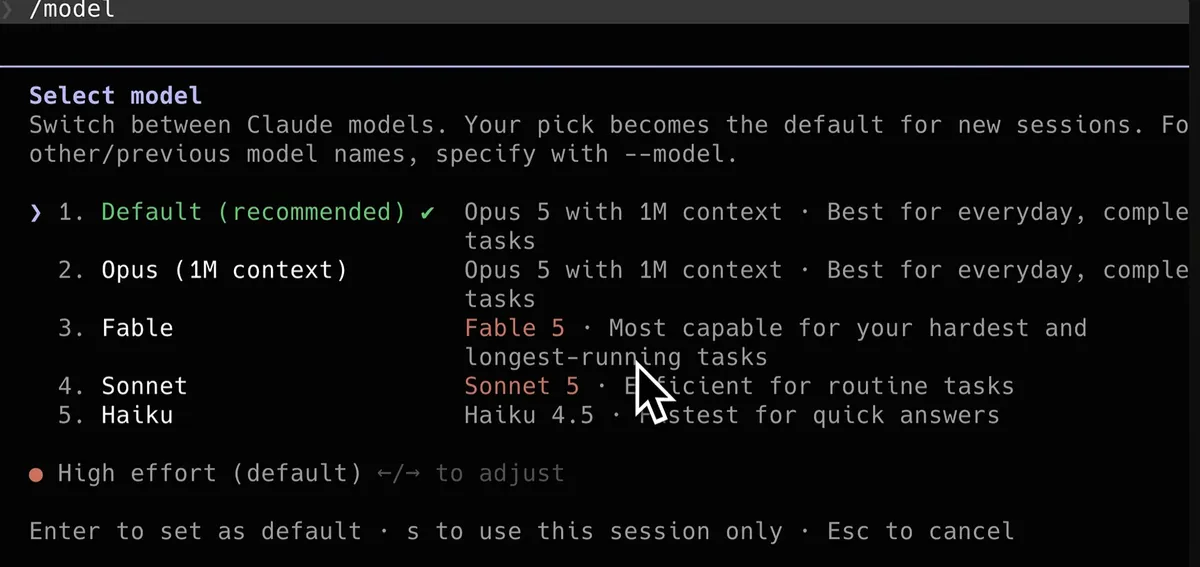
4. I match the model and reasoning level to the task
I do not use the strongest model and highest reasoning level for every job. A copy change, file lookup, or focused CSS fix usually does not need the same investment as architecture planning, an intermittent production issue, or a large migration.
I begin with a balanced or lower reasoning level for a clear task and increase it only when the measured quality is insufficient. OpenAI's current model guidance makes the same point: higher reasoning effort is not automatically better. It can add time, cost, and unnecessary exploration when the goal or stopping criteria are weak.
5. I keep persistent instructions short and relevant
A rule in AGENTS.md or CLAUDE.md may enter the context repeatedly. I keep only information the agent needs for almost every task: build and test commands, important constraints, code conventions, and architectural decisions that are not easy to infer from the repository.
A long procedure used only for deployments, article writing, or database work belongs in a dedicated skill. Claude Code can also scope rules by path so frontend instructions do not load during backend work. Its documentation recommends targeting fewer than 200 lines for each CLAUDE.md file and reviewing the files for stale or conflicting guidance.
6. I reduce tool output without hiding evidence
A log with tens of thousands of lines can fill the context faster than the conversation. Before I run a command, I ask what output would actually help the diagnosis.
Instead of reading an entire directory, I search for a filename or string. Instead of printing every test result, I start with the failing test and nearby lines. I filter logs by time, severity, or a reasonable line count, then widen the view only when evidence is missing.
I keep exit codes, the main error, and the relevant stack trace. A filter that hides the useful evidence creates another round of work and costs more in the end.
7. I choose between CLI, MCP, and built-in tools based on the job
CLI is not always cheaper, and MCP is not always wasteful. A focused CLI command works well for local search, Git, and tests. An MCP tool is useful when I need a structured action in an external service, explicit permissions, and output the agent can process reliably.
When a system offers many tools, I prefer on-demand loading or tool search when available. That avoids placing the full description of every possible integration in the initial context. I choose based on context cost, output precision, permissions, and verifiability instead of a blanket rule.
8. I use subagents for independent work
Code research, log inspection, and option comparisons can flood the main conversation. A subagent with a separate context can do that work and return a focused summary.
I delegate when the work is bounded and can progress independently. I also specify the return format: findings, evidence, and a short recommendation. Many agents returning long reports can consume more context than they save.
9. I keep side questions outside the active task
A quick syntax question should not change the course of an implementation. Claude Code provides /btw for a side question that does not enter the conversation history. In Codex, I can open a separate task or conversation when the subject is unrelated to the active work.
This habit keeps one goal and one clear stopping condition in the main thread.
10. I audit what memory actually loads
In Claude Code, both CLAUDE.md and auto memory load at the beginning of a conversation. The documentation says the first 200 lines or 25KB of the auto-memory index load at startup, while topic files are read when needed. I use /memory to inspect and edit that material and /context to see what loaded.
In Codex, I review AGENTS.md, skills, and persistent project instructions. I remove duplicate and outdated rules instead of disabling an entire mechanism without understanding what it contributes.
11. I measure usage instead of guessing
Claude Code exposes usage information through /usage and context information through /context. In Codex, I use the account or app usage view available to me.
I do not assume every user has the same reset window or allowance. Plans, models, and product policies change. When I work through an API, I also track input tokens, cached tokens, output tokens, tool calls, and cost.
12. I change one variable in each experiment
If I switch models, lower reasoning, shorten instructions, and replace a tool in the same test, I will not know what helped. I keep the task, commit, and success criteria fixed, then change one variable.
I compare four things: whether the task completed correctly, elapsed time, context or usage consumed, and the amount of manual intervention required. A useful optimization saves resources without weakening the result.
The workflow I would keep
At the start of a task, I define the outcome and success criteria. I choose a model and reasoning level that match the risk and complexity. During execution, I keep tool output focused and move independent investigation into a separate context. When the context begins to fill, I compact with an explicit preservation checklist. When the goal changes, I start a new task.
One principle connects all of these practices: I want each token to advance a decision, a change, or a verification. A large context window is useful, but a disciplined workflow determines how much value I get from it.
Official sources checked
- Claude Code commands
- Claude Code memory and CLAUDE.md
- Claude Code subagents
- OpenAI model guidance
- GPT-5.6 Sol specifications Information checked on September 9, 2026. Command names, model availability, and usage limits can vary by version, plan, and environment.
Keep reading

GuideAI
Five Claude Code tools: what to install and why
Session memory, context compression, model routing and project recommendations. Choose the addition that addresses your actual problem.

GuideAI
How to edit videos with ChatGPT Codex and Remotion
A practical workflow for editing talking-head video with Codex and Remotion, including transcription, silence cuts, captions, approval checks, and copyable prompts.

ArticleAI
I Spent a Week with the DeepSeek Harness — Here's How It Compares to Claude Code
A week-long hands-on comparison of DeepSeek Harness and Claude Code - speed, reliability, and design quality, from someone who ran both side by side on the same real tasks.
Follow us
TikTok · X · Instagram · Telegram
Ready to automate?
Let’s build a system that works for you — not the other way around.