
AI
Sell Used Items with ChatGPT: Pricing, Listings and Buyer Replies
Use item photos and sales evidence to research prices, draft Marketplace listings and review buyer messages. Includes eight prompts and a private item record.
Headphones in a drawer, a spare chair and a camera that has not left the cupboard in a year. Taking photos is usually straightforward. Choosing a price, writing the listing and answering buyers are the parts that get postponed.
In this guide, we start with photos and build an item record using facts you can check. Then we move to pricing, listing copy and buyer messages. Supported browser tools may help with publishing, but each listing and commitment stays under your control. The examples are illustrative, not records of my sales or earnings.
How can ChatGPT help sell used items?
Attach photos, ask it to identify visible details, research prices and draft listings. Browser tools can help operate a supported website depending on the account and permissions. Photos do not establish working condition, authenticity or battery health. State what you tested and what remains unknown. See image inputs and browser capabilities.
Prepare evidence buyers can trust
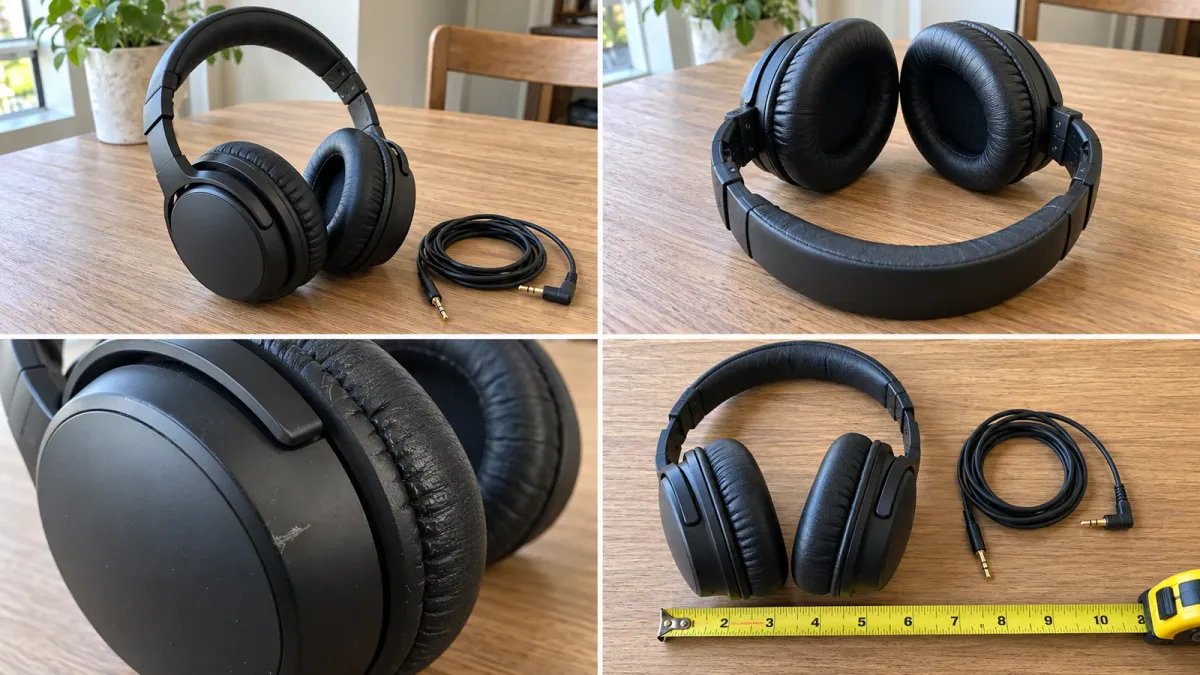
Start with one to three items. Photograph the whole item, reverse side, model label, accessories and defects in good light. Measure furniture and test devices yourself. Do not use a generated image that erases a scratch or adds an accessory you are not including.
The example photo set below was generated with AI to illustrate useful angles. It is not an actual item offered for sale. Use real, current photographs of your own item in the listing.
Give each item a short name. Add your city, currency, desired selling timeframe and confirmed working condition. Keep photos and decisions in the same conversation or in an item record you can carry to a new one.
Prompt 1: Research prices using condition and sales evidence
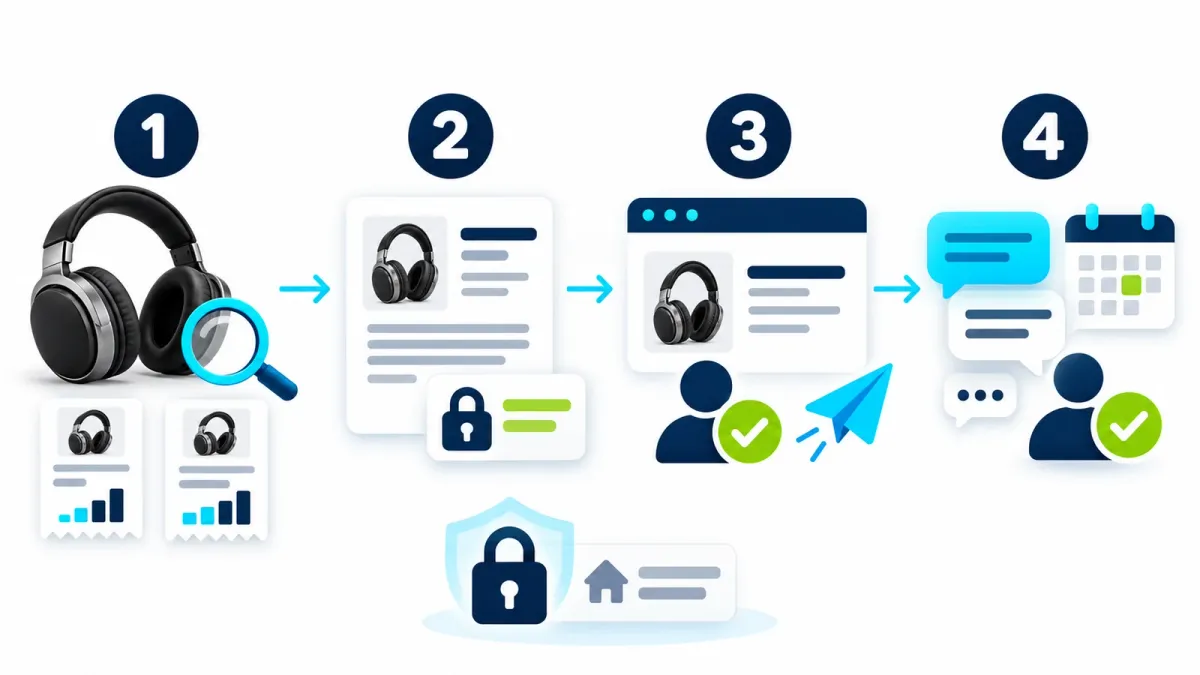
An asking price is not necessarily what a buyer paid. Request an explicit distinction.
I am selling the items in these photos. City: [city]. Currency: [currency]. Desired selling timeframe: [timeframe].
Identify brand and model only where readable or verifiable. Describe visible condition and ask about function, authenticity and details the photos cannot prove.
Research recent completed sales of the same or a closely matching model. Aim for three to five useful comparisons when data exists.
Give a link, date and price for each comparison. Explain differences in condition, accessories, location and shipping.
Label asking prices separately. If the final sale price or accepted offer is hidden, say so; never invent a sale or link.
Suggest a value range, listing price and potential quick-sale price, explaining confidence.
When evidence is limited, label the estimate and tell me what to check manually. Maintain an item record for the next steps. Respond in English.
For items with an international market, eBay Product Research can provide sales data, including accepted Best Offer prices, when you have access. Do not assume every ordinary result reveals the accepted amount. eBay’s Product Research explanation.
For large furniture, check local listings and collection costs too. A sale abroad may involve conditions that do not match a nearby buyer’s options.
Prompt 2: Write the listing and keep a private minimum
Review the pricing before drafting. The listing price is public. Your minimum is a private decision after relevant costs.
Write a Facebook Marketplace listing for each item using only my real photos and confirmed facts.
Include a searchable title with the specific product name, natural description, category and condition to check, listing price and suggested photo order.
Include confirmed dimensions, accessories and flaws. Do not claim like new, authentic, smoke-free or fully working without my confirmation.
Public pickup area: [city/general area]. Delivery: [pickup/shipping]. Keep my exact address out of the listing.
Separately suggest a minimum price for my approval, accounting for applicable fees, packaging and shipping. Never include it in public copy or buyer replies.
Show a private table with item, listing price, approved or unapproved minimum, delivery method and status.
Do not publish yet. Ask about missing information instead of filling it in.
Add a truthful personal sentence if it helps explain the sale. “Selling because I am moving” belongs only when that is the reason. A specific model name and useful condition photos do more work than repeated keywords.
Prompt 3: Prepare one listing for approval
Check the platform’s current item rules and your account’s Marketplace access. There is no promise that every account or website supports automated completion.
Open Facebook Marketplace in the authorized browser and prepare a draft for my first approved item.
Use our agreed real photos, title, description, price and general location.
Pause for me to complete login or security checks. Confirm with me that this is the correct account.
Check whether the item already has a listing so we avoid duplicates.
Show me the completed draft, including photos, price, location and delivery settings. Wait for my explicit approval of this exact listing.
After approval, publish once and verify the outcome. Record its link and whether it is live, pending review or blocked.
Do not describe drafts or pending listings as live. Check the result before moving to another item.
If an upload or another step cannot be completed, explain what I must do and provide final copy and photo order for manual posting.
Work’s cloud browser uses a separate session from your personal browser. Sign in through its provided interface without pasting passwords or verification codes into chat. Desktop environments may support a connected local browser; check which one is being used. Browser sessions and access.
If the outcome is unclear, inspect existing listings before retrying. A listing awaiting platform review should not be duplicated.
Prompt 4: Test buyer-message access before scheduling
Begin with one check that sends nothing. A saved schedule does not establish that it reached the inbox. OpenAI recommends testing the prompt before scheduling and reviewing early runs. Scheduled tasks.
Help manage messages for the active listings in our item record.
First run one Marketplace inbox check. For each new message, show the item, buyer, message and proposed reply. Send nothing during this test.
If access fails, explain the limitation and let me paste messages manually.
Only after I confirm the test worked, schedule a daily check at [time] in [time zone], if supported tools allow it.
Save the listing links, confirmed facts and private minimums in the instructions. Show the saved task and next run time.
Draft concise factual replies. Never go below or reveal my minimum. Show the exact buyer and message for approval before every send.
Do not agree to a sale, hold, meetup, shipping or payment change without approval. Avoid duplicate replies.
Report meaningful changes, scam concerns or decisions needed. Stay quiet when nothing changes.
Remove items I mark sold and pause the schedule when no active listings remain.
If recurring browser access is unavailable, offer a reminder for manual review instead of promising monitoring.
After saving, inspect the first run result too. An expired session or approval request can interrupt the task. If it depends on your local computer, keep the machine, app and necessary resources available. Testing scheduled work and access requirements.
Four more useful prompts
5. Investigate an item before lowering its price
Which items in our record might interest collectors or buyers of a particular model?
Show evidence and separate possibilities from verified identification. Do not certify authenticity or rarity from a photo alone.
Tell me which label, photo angle or expert check is missing before changing the price.
6. Choose a suitable platform
Suggest one selling platform and one backup for each item in [country and city].
Check availability, item rules, fees and shipping against current official terms.
Compare local pickup with shipping, showing estimated proceeds after known costs and your assumptions.
Flag missing information. Do not assume a service or seller protection is available in my location.
7. Respond to a low offer
Buyer message: [message]. Item: [item]. Public listing price: [price]. Private minimum: [amount].
Draft a friendly reply that addresses the question and suggests a suitable counteroffer above my minimum.
Do not reveal the minimum or promise a hold, delivery or meetup. Do not send the draft.
8. Review a suspicious message
Review this buyer message: [message with unnecessary personal details removed].
Identify specific warning signs and what I can independently verify inside the real marketplace or payment account.
Do not open payment links from the message, share codes or send anything.
If the evidence is inconclusive, say so. Suggest a short reply only if useful.
Before handing over the item
A buyer’s payment email or screenshot is not proof you received money. Open the real payment account yourself. Requests for verification codes, an overpayment refund or a fee to release funds are reasons to pause and verify. The FTC describes these patterns in online selling scams. FTC guidance for sellers.
Choose a suitable safe location for local handoffs where practical. Home collection of furniture needs private arrangements and consideration of who will be with you. Keep the exact address out of public copy. For shipping, review the relevant platform’s current fees, tracking and seller-protection requirements before committing.
For electronics, follow the manufacturer’s backup, account-removal and reset instructions. Verify that personal data is removed and tell the buyer what you could not test.
Keep a simple private item record
| Private field | Why it helps |
|---|---|
| Item, model and listing link | Identify the buyer’s item and avoid duplicates |
| Listing price and approved minimum | Maintain negotiation boundaries |
| Live, pending, blocked or sold | Know whether checks should continue |
| Latest offer and next action | Distinguish drafted replies from sent messages |
If messages are scarce, inspect the lead photo, title and price against fresh comparisons. Change one element at a time. Silence alone does not require a large price cut.
Frequently asked questions
Can a photo alone establish the selling price?
It can start identification and an estimate. Exact model, function, accessories and sales evidence improve the estimate. Label uncertainty when those details are missing.
Can ChatGPT publish through every Facebook account?
That is not guaranteed. It needs account and Marketplace access, suitable tools and a site that permits completion. Use the prepared draft manually when that route is unavailable.
Will a daily task automatically answer buyers?
The prompts here prepare replies for approval. Check access on each run. Creating a task is not blanket authorization to send messages or close a deal.
Can AI confirm that a buyer is trustworthy?
It can flag suspicious patterns and suggest questions. It cannot guarantee identity, trustworthiness or payment.
Choose one item today, photograph its condition and run the first two prompts. Confirm the facts and price before publishing. For more templates, visit the ChatGPT command library.
Keep it for later
Take the guide with you
Save the complete guide to read and annotate offline, or print a copy to keep beside you while you work.
Keep reading

GuideAI
100 useful ChatGPT commands
A practical shortcut library for writing, research, learning, marketing, and productivity, with one-click copying.

GuideAI
Find Discount Codes with ChatGPT: Search, Test and Compare
Two prompts to find coupon candidates and test them in your cart, plus five follow-ups for offers and prices. Compare totals and handle payment yourself.

GuideAI
ChatGPT Deep Research: A Practical Guide to Research with Sources
Frame a research request, compare products, plan a trip and verify the evidence. Includes four prompts to adapt and a reusable research template.