
AI
ChatGPT Deep Research: A Practical Guide to Research with Sources
Frame a research request, compare products, plan a trip and verify the evidence. Includes four prompts to adapt and a reusable research template.

Choosing a product, planning a trip or researching a company before an interview can leave you with dozens of open tabs. Each page holds a different piece of the answer. You still have to connect prices, reviews, dates and limitations.
Deep Research in ChatGPT helps investigate a question across multiple sources and organize the findings into a report you can review. This guide covers how to frame the request, four examples to adapt and a practical way to check the result. The examples are illustrative scenarios, not completed research reports or product tests.
What is ChatGPT Deep Research?
Deep Research investigates a defined question, gathers information from different sources and summarizes its findings. It is useful for comparisons and decisions with several competing criteria. Source links help you inspect the evidence behind a conclusion. A link alone does not establish that the conclusion is correct. OpenAI’s research guidance.
For a single address or event date, a quick search will usually do. For a decision that depends on your budget, preferences and constraints, a structured research request makes more sense.
How to start Deep Research
The documentation checked on October 13, 2026 describes routes that depend on your interface and account access:
- In Work, start a chat, open the
+menu and choose Deep research when available. - In the desktop app, you can also open Plugins, select Deep research, install or enable it if needed, then choose Try now.
- Describe the question, scope and result you need. Include relevant files or connected app context that your account supports.
- Review the finished report and its sources, then ask focused follow-up questions.
Workspace settings also affect availability. If you cannot find the option, check the tools and plugins available to your account. Official starting steps.
Prepare the question before you research
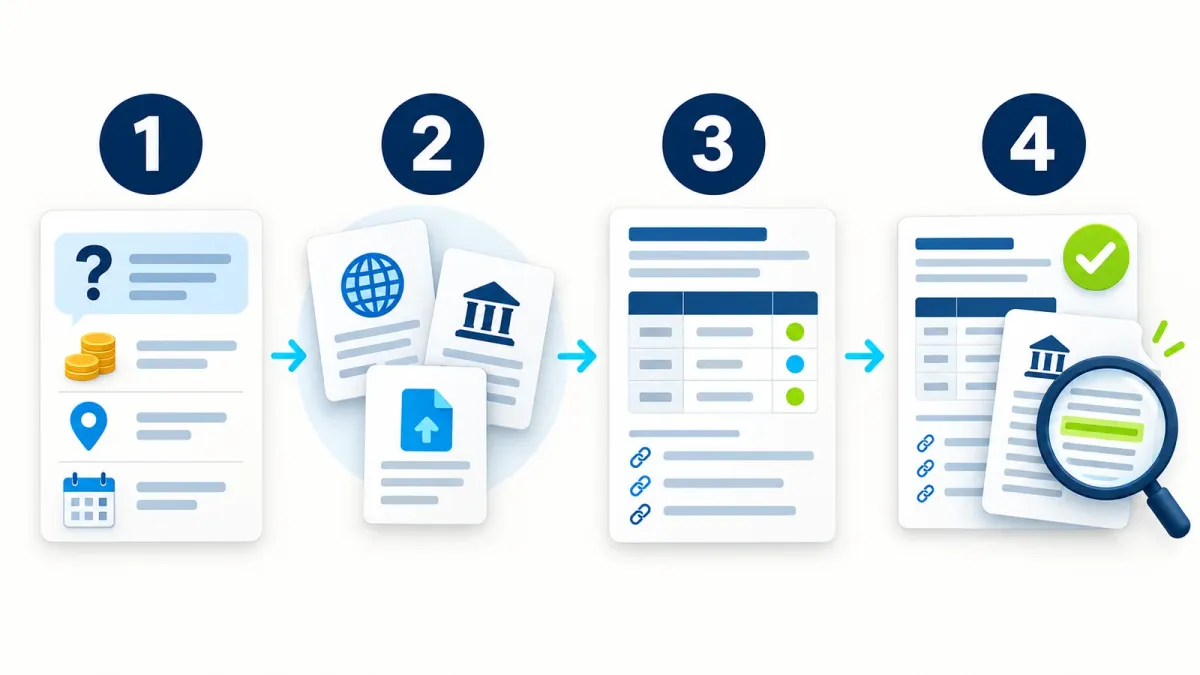
“What is the best robot vacuum?” leaves many decisions open. Hard floors, a large dog and a limited budget call for a different comparison than carpets and no pets.
Describe the decision, location, deadline and criteria. Adapt this template:
I need to make a decision about [topic].
Context: [who this is for, country, budget and relevant date].
Compare options using [3–5 criteria, in priority order].
Prioritize current primary sources; add independent reviews where useful.
For changing figures, include the source date and the country they apply to.
Separate established facts, user experiences and your own interpretation.
If essential information is missing, ask before researching. Do not guess it.
Return in English: a brief summary, comparison table, reasoning, sources and unresolved gaps.
This is an ordinary language request, not a special system command. OpenAI’s research prompting guidance emphasizes context, preferences, sources and the requested output format. OpenAI’s research prompting guide.
Check the direction before going deeper
If ChatGPT asks clarifying questions or presents a research plan, use that moment to correct the scope. For the vacuum example, check that the comparison covers models sold in your country and prices that include the relevant dock.
You can also request a short plan first and start the research once the scope fits. That is a suggested workflow here; it does not assume every interface has the same approval screen.
Four Deep Research examples to copy
Choose one example and replace the details before submitting it. These are separate use cases, not four prompts you must run in sequence.
1. Compare robot vacuums
The goal is a shortlist that fits a particular home, including reasons to rule out a model that looks good on paper.
Research robot vacuums sold in the United States for a total budget of $500.
Illustrative scenario: a 900-square-foot apartment, mostly hard floors, with a long-haired dog.
Compare up to five models on hair pickup, mopping, noise, maintenance, app quality and local support.
Check current price and availability. Specify what the price includes and consumable costs where known.
Use manufacturer specifications, independent tests and user reviews from the past year.
Flag sponsored reviews when identifiable. Do not treat user ratings as laboratory test results.
Return in English a comparison table with sources, two leading options and each option’s main drawback.
If fewer than five models meet the requirements, explain the gap and show fewer.
In the result, pay particular attention to hair pickup and maintenance. A quoted suction specification does not answer the whole question.
2. Plan a Lisbon trip
Travel research needs specific dates and a clear budget. Otherwise, the report can produce a crowded itinerary with unclear costs.
Research a six-day Lisbon trip for two adults in late October [year].
Our daily budget is €250 for both people, including accommodation, meals and transport, excluding flights.
We prefer food markets, walking and one day trip by train.
Compare three areas to stay in on accessibility, approximate cost, noise and neighborhood character.
Suggest an itinerary with realistic travel times and a rainy-day alternative.
Check opening hours, required reservations and transport fares using official sources for our dates.
If schedules or prices are not published yet, say so rather than inventing them.
Return in English an itinerary, budget estimate, verification links and three mistakes to avoid.
Before booking, open the hotel’s website and the transport operator’s website yourself. Availability and prices may change after the report is written.
3. Prepare for a job interview
The report should help you understand the business and ask useful questions. Understanding its products and customers is often more useful than a headcount alone.
Research [company name and official website] for an interview for [role] on [date].
Investigate its products, customers, business model and significant developments over the past six months.
Prioritize the company website, official announcements, public filings and regulatory documents when available.
Treat employee reviews as individual experiences that may be biased or unrepresentative.
For legal issues, distinguish allegations, pending proceedings and established outcomes.
Do not guess revenue, funding or headcount without a suitable source.
Return in English a one-page briefing, product and customer overview, relevant risks and five role-specific questions.
Include sources and dates, and clearly flag unverified information.
A useful interview question can come from a gap in the report: “I saw the company is entering a new market. How will that affect the team’s priorities?”
4. Prepare questions for a medical appointment
Research can help explain terms and organize questions for a clinician. This is a hypothetical example, not a personal treatment recommendation.
Prepare a general information review for an adult diagnosed by a clinician with mild obstructive sleep apnea.
The goal is to prepare questions about CPAP versus an oral appliance for a medical appointment.
Prioritize guidelines from medical organizations and peer-reviewed studies. Include publication dates.
Compare evidence on effectiveness, adherence, side effects and situations requiring professional assessment.
Explain which personal clinical details are needed for a treatment decision without requesting identifying information.
Flag weak evidence, disagreements and differences between patient groups.
Do not diagnose me or choose a treatment. Return in English an accessible explanation and eight questions for my clinician.
Review the medical sources with a qualified professional. Do not change treatment based solely on an AI report.
How to check a report with citations

Start with the three claims that matter most to the decision. Open the source beside each claim and read the relevant passage, rather than just the page title.
- Support: Does the source actually say what the report attributes to it?
- Timing: Is the price, rule or schedule still current?
- Context: Does it cover the same country, product version or population?
- Independence: Are several articles repeating one company announcement?
- Uncertainty: Does a confident conclusion rest on incomplete data or one review?
If something does not add up, follow up with:
Recheck the report’s three main conclusions.
For each, show the direct source, its date and the passage supporting the conclusion.
Identify conflicting sources or gaps in the evidence.
Correct any wording that presents an assumption as a fact, and explain what changed.
This request supports review. It does not replace opening the sources yourself.
Search, Deep Research and Work: which should you use?
| What you need | Useful route | What to check |
|---|---|---|
| One current fact | Search in a chat | Source and date |
| A comparison with several criteria | Deep Research | Evidence and reasoning |
| A report, file or task with several steps | Work with suitable tools | Sources, final file and actions taken |
These routes overlap: research can happen inside Work. Work tools may use files, plugins and websites according to their permissions. Specify whether you want research only or additional actions, such as updating a file. Work capabilities and permissions.
Files, limits and saving the report
Attach only relevant documents you are allowed to share. When using a connected app, check that the connection is authorized and specify which information the research needs. Accounts do not necessarily have the same services or permissions. Context and connected tools.
This guide does not promise a fixed quota or a report in a few minutes. Check the availability and usage notices in your account before starting. Work usage depends on your subscription, tools and task complexity; it does not translate into a uniform number of reports. OpenAI’s explanation of usage limits.
To save the result, use the download options offered by your interface. If you need a particular file, name the format explicitly. Work can create documents and PDFs on supported surfaces. After downloading, check that the source links remain usable. Working with files.
Frequently asked questions
Is Deep Research always accurate?
No. Citations make evidence easier to inspect, but the report can still use an unsuitable source, misread evidence or include outdated information. Check the claims that affect your decision.
Can I request a report in Hebrew?
Yes. Specify the output language in your request. You can ask for research using English sources and a Hebrew summary with links to the original sources.
Do I need a paid subscription?
Check availability in your account. This guide does not assign a universal quota or entitlement; access depends on the subscription, interface and workspace settings. Availability guidance.
Can it use information behind a login?
Only through an authorized tool or connection available in the relevant environment. A link to a private area alone does not establish access. Do not paste passwords into a research prompt. Context and tools in Work.
Do I need an API to get started?
Not for the interface workflow described here. Building research through the API is a separate development route with its own tool configuration and pricing. ChatGPT versus API research.
Your first research task
Choose one decision you are considering now. Adapt the research template, run it and check three central claims against their sources. You can then see what the report establishes and what still needs an answer before you act.
For more prompts to adapt, visit the ChatGPT command library.
Keep it for later
Take the guide with you
Save the complete guide to read and annotate offline, or print a copy to keep beside you while you work.
Keep reading

GuideAI
100 useful ChatGPT commands
A practical shortcut library for writing, research, learning, marketing, and productivity, with one-click copying.

GuideAI
200 ChatGPT image and video shortcuts: my workflow
200 short requests for portraits, products, ads, branding and video. My guide covers defining shortcuts, using references and connecting Higgsfield.

ArticleAI
Where to Find Design Inspiration Before You Prompt Claude
Six kinds of sources I use to give Claude something visual to aim at, so AI website output stops defaulting to the generic average.