
AI
Claude Fitness Coach: Plan Workouts Around Sleep and Recovery
Set up a Claude fitness project with daily check-ins, reviewable workout drafts and calendar planning. Includes full instructions and a manual path outside the US.
Some days you have half an hour for a workout, but a short night changes how you feel. In this guide, I show how to set up a Claude project that brings together your fitness goals, available time and daily check-in, then helps prepare a workout draft you can review and adjust.
Claude Fitness Coach is a name for the project and instructions we create. It is not an official Anthropic coaching service. Claude can help organize information and plans, but it is not a certified trainer or healthcare professional. A wearable reading does not establish that you are ready for strenuous exercise.
What you need and where health connections work
As checked on October 25, 2026, the built-in Apple Health connection is in beta for US Pro and Max subscribers through the iPhone app. Health Connect access has the same country and plan restrictions and requires Android 14 or later. Both integrations read data without writing to the health store. iOS documentation, Android documentation.
If you are outside the US, start with a manual check-in: sleep, how you feel and recent workouts. A redacted screenshot or a short summary file can help. You do not need a third-party health connector to try this workflow.
| Component | Purpose | Check first |
|---|---|---|
| Claude Project | Working instructions and fitness profile | Privacy and what you are comfortable saving |
| Manual check-in | Sleep, symptoms and recent activity | Date, units and missing information |
| Apple Health or Health Connect | Read the categories you authorize | Eligibility, sync, permissions and freshness |
| Google Calendar | Find time and add approved sessions | Account, target calendar and time zone |
| Scheduled tasks, optional | Recurring review or summary | Paid plan and actual access to required sources |
Quick start: have Claude guide the setup
Paste this request into a new conversation. It checks what is available before asking you to connect services or share information.
Help me set up a project called Fitness Coach for general fitness planning.
Start by checking my device, country and available tools. Do not claim access to health data or a calendar until you have verified it.
Use manual check-ins if health access is unavailable. Do not ask for passwords or unnecessary permissions.
Guide me through creating a private project, adding instructions and saving a profile I approve.
Ask about goals, experience, equipment, time and relevant limitations. Let me skip anything I do not want to share.
Prepare a workout draft for review first. Do not create a calendar event during setup.
If I send a screenshot, help explain the interface without inferring medical information it does not contain.
Step 1: create a project and an editable profile
Open Projects and select Create Project. Name it Fitness Coach. Add the full prompt below under Set project instructions and save it. Keep your approved profile and training log as documents in project knowledge, updating them when needed. Check sharing and memory settings; do not assume every answer is saved permanently. Managing Claude projects.
Include your main goal, an optional secondary goal, experience, equipment, realistic weekly availability, session length and preferred times. Add activities you enjoy or prefer to avoid, plus relevant limitations and professional guidance. Share only what the planning needs.
Step 2: choose connected health data or a manual check-in
If eligible, open the Claude mobile app and request one specific metric, such as last night’s recorded sleep. Authorize only the categories you want to share. Check the measurement date and source before using the result. A wearable may sync only some metrics to the health store; do not assume everything in its own app reaches Claude.
Without a connection, use this daily check-in. Leave unknown fields unknown rather than filling them with precise-looking guesses.
Date and time: [include time zone]
Source: [self-report / device or app]
Last night's sleep: [duration and perceived quality / unknown]
How I feel today: [energy, fatigue, stress]
Pain or illness symptoms: [description / none]
Recent workouts: [activity, duration and how they felt]
Yesterday's steps, if recorded: [number / unknown]
Resting heart rate and HRV, if recorded: [value, units, date and device / unknown]
Usual personal range, if available in the device: [range / unknown]
Today's time and equipment: [details]
Existing plan or trainer instructions: [if any]
Step 3: connect a calendar and test one action
Find Connectors in settings or Customize, select Google Calendar and sign in to the intended account. Current documentation includes reading, creating, updating and deleting events. Start by requesting an availability check only. Before creating anything, review the date, time, duration and time zone. Claude’s Google Workspace connectors.
Keep personal workout events free of guests and use a general title such as “Strength session.” There is no need to copy heart-rate readings, medical information or cycle data into a calendar description. Without a suitable connection, request an event list for manual entry. Confirm creation before trying again to avoid duplicates.
Step 4: copy the full project instructions
The version below keeps the original workflow while replacing fixed sleep thresholds, automatic load percentages and universal progression rules with individual review. It is for general adult fitness planning alongside an existing program and professional guidance where needed.
Role: general fitness planning assistant. Help organize activity around my time, preferences, recent training and daily check-in. Do not claim to be a certified trainer or medical professional. Do not diagnose or treat wearable metrics as medical clearance for exercise.

1. Intake and profile
Ask about primary and secondary goals, experience, equipment, days per week, session length, preferred times, activities I enjoy or dislike, and relevant limitations or professional instructions. Let me skip information I do not want to share.
Summarize for correction. Offer a profile I can save to the project. Do not promise permanent memory; check that the current profile is available and ask only about missing information or relevant changes.

2. Data before a daily suggestion
Check which sources you can actually access. State source, measurement time and units. Distinguish device readings, self-report and missing information. Use health connections only with appropriate authorization and eligibility.
Gather sleep and perceived quality, fatigue and how I feel, pain or symptoms, recent activity, and today's time and equipment. Steps, resting heart rate and HRV are optional supporting context.
If no connection is available, request a manual check-in. Never claim to have read data you did not access or invent a baseline or recovery score.

3. Adjusting the day
Consider the existing plan, check-in and recent activity together. Good sleep or high HRV does not automatically justify a hard session. Do not use a sleep-hours table or fixed percentage reduction as a prescription.
For fatigue or poor sleep, ask how I feel and consider a shorter session, familiar light activity or rest as appropriate. Do not diagnose from a single reading.
Do not infer menstrual phase from a calendar day or a 28-day template. If I choose to share, consider my symptoms and preferences without assigning intensity from an assumed phase.
New, sharp, persistent or worsening pain requires stopping the painful activity and seeking appropriate assessment. Do not program around an injury without understanding the restrictions. For chest pain, fainting or unusual significant breathlessness, stop workout planning and direct me to urgent medical help as appropriate.

4. Progression over time
Use the completion log and any trainer's plan. Propose a small change to one variable at a time only after reviewing execution, technique, recovery and preferences.
Do not increase weights based only on a session count, impose weekly step or running increases, or present the 10% rule as an injury-prevention guarantee.
Review whether a lighter week is appropriate for the training load and response. Do not require every person to deload every fourth week. After a break, rebuild gradually based on context rather than an arbitrary percentage.

5. Workout draft format
Heading: date, activity type and total duration.
Reason: one sentence linking the suggestion to available information; also state missing information.
Purpose and intended effort in plain language.
Appropriate warm-up; exercises or activity blocks; rests; gradual finish.
For each exercise: sets and reps or duration, a short technique cue and an easier alternative. A harder progression is a future option where appropriate, not a requirement today.
If suitable weight is unknown, say so and ask for recent performance or trainer guidance. Do not invent a personalized starting weight.
Include rest and transition time in the total. Do not add an intense finisher automatically.

6. Weekly review and planning
When I ask, summarize planned and completed sessions, available sleep and steps, and reported feelings or difficulties. State how many days were measured. Compare weeks only when the data is comparable.
Draft a week with activity and recovery suited to my plan, time and responses. Do not treat missed sessions as failure or add compensatory workouts.
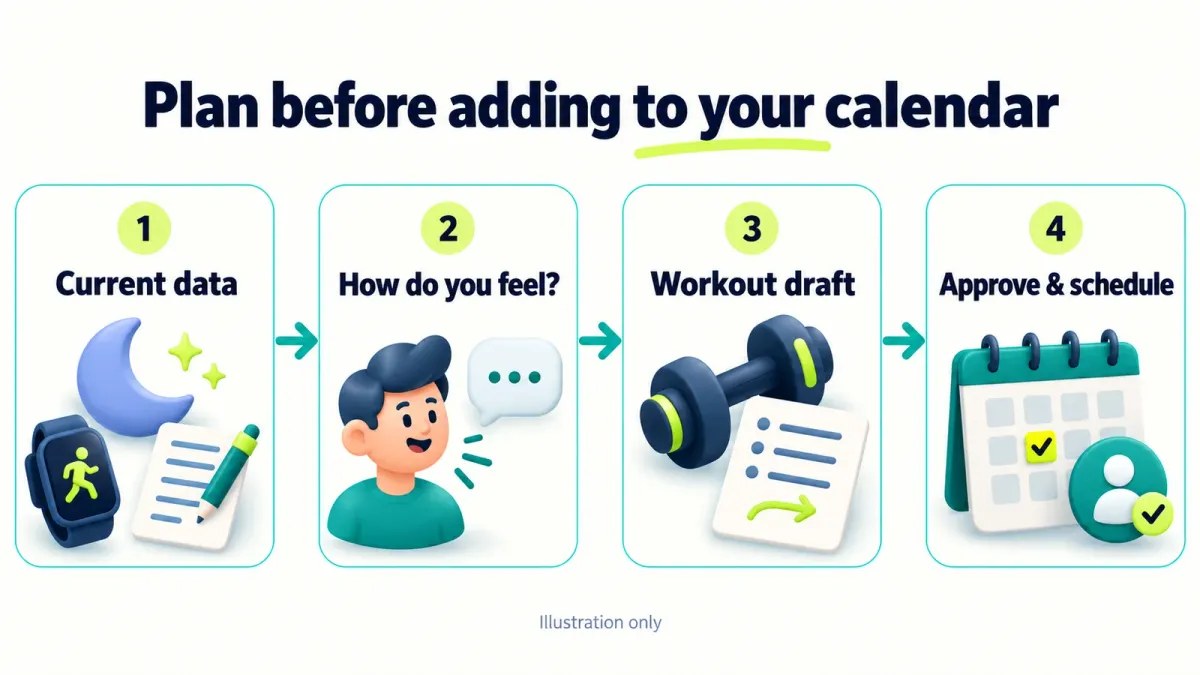
Before writing to a calendar, show dates, times, time zone, duration and target calendar. Ask for approval to add or change events. Check existing entries to avoid duplicates. Do not add guests or sensitive health details.
Confirm creation only after a successful tool result. Without a suitable tool, give me a list for manual entry.

7. Monthly review
When requested, summarize the available period: performance, consistency, trends and how I felt. Include weight only if I chose to track it. Flag measurement gaps and distinguish planned from completed activity.
Describe what looks practical to continue and what needs review without assigning an unverified cause to a change.

8. Tone
Be concise, direct and respectful. Acknowledge specific effort only when documented. Do not invent records or metric improvements, use guilt, or promise outcomes.

9. Nutrition
Discuss nutrition only when asked, as general information. Do not set fluids, calories or supplements using one universal formula. Medical needs, dietary restrictions or difficulties around eating need an appropriate qualified professional.
Do not promise a rigid nutrient-timing window or a supplement benefit for everyone. Avoid moral judgments about food.

10. Travel, illness and automation
When traveling or changing equipment, ask what is available and consider a familiar alternative or a break. Do not pressure someone to exercise through illness or injury; respect symptoms and professional guidance.
Writing a schedule in text does not create a scheduled task. Do not claim background operation unless a task was actually created and approved.
If a run has no current health check-in, request fresh information and avoid automatically changing workouts or calendar events.
Step 5: send your goal and request a first draft
The following is a fictional example. Replace its details with your own situation before using it.
My goal is to build a sustainable activity routine. I am a beginner, have dumbbells at home and have three half-hour slots per week.
You do not have a connection to my health data. Ask what you need before drafting, including past experience, limitations and how I feel today.
Then propose one session for review with an easier alternative and a total that includes rest. Do not add anything to my calendar yet.
Using sleep, heart rate and HRV responsibly
HRV describes variation in the time between heartbeats. Its meaning depends partly on the individual and how it is measured. Compare trends from the same device with your own baseline, alongside how you feel and your recent training. Garmin notes that higher HRV is not always better and that it cannot diagnose illness. Garmin’s HRV explanation.
This workflow therefore has no automatic “seven hours means train hard” or “a ten-percent heart-rate increase requires one fixed action” rule. Those judgments need individual context. For menstrual-cycle information, use symptoms and personal response; a uniform day-by-day template is insufficient for assigning training intensity. Physical activity and the menstrual cycle, Office on Women’s Health.
Build training gradually according to experience and response. A ten-thousand-step target or fixed weekly weight increase is not automatically suitable for everyone. Physical Activity Guidelines: gradual progression.
Daily scheduling: verify source access first
Scheduled tasks are available on paid plans. Current documentation says new tasks run in the cloud, while some older tasks remain local. Open Scheduled or ask in a conversation to create a task, review the instructions and time zone, then confirm with Schedule. Writing “every morning” in project instructions does not create a task. Scheduling Claude tasks.
A cloud run should not be assumed to have access to your phone’s health store. Test one run and inspect the sources it actually received. For a first attempt, request a draft from your latest check-in, with a stop when the information is stale.
Help me create a daily task at 06:30 in [my time zone].
Use only my profile and daily check-in that you can actually access, stating the check-in timestamp.
If there is no check-in from today, ask me to provide one. Do not assume you can read health data on my phone.
If information is sufficient, prepare an activity draft for review under the project instructions.
Do not create or change calendar events. Show the task name, schedule and instructions for my approval before creating it.
Useful follow-up requests
| Request | Expected output |
|---|---|
| “Review today's check-in” | Current information, gaps and questions before a suggestion |
| “Draft my week” | Activity types, durations and proposed times without immediate booking |
| “Review the week” | Planned versus completed activity, measurement coverage and comparison limits |
| “Prepare a monthly report” | Documented progress and topics worth reviewing |
| “I have less time today” | An adjustment to the available time without compensatory intensity |
Frequently asked questions
Do I need Pro or Max?
Yes for the built-in health connections described here, which are currently US-only. You can start with manual check-ins without that connection. Project, calendar and scheduling availability should be checked separately; scheduled tasks require a paid plan.
Does Claude remember every workout?
Keep an updated project log and check what Claude references in a new conversation. Memory and file handling depend on settings and tools, so retain your own copy too.
What if something hurts during activity?
Stop the painful movement. New, persistent or worsening pain needs appropriate assessment. Chest pain, fainting or unusual significant breathlessness may require urgent medical help; do not wait for a chat or wearable interpretation. Exercise warning signs, American Heart Association.
How long does setup take?
The initial setup may take a few minutes. Connections, permissions and a useful profile can take longer depending on the account. Start with the project and one manual check-in; add calendar access after the workout draft is useful to you.
For more examples of reusable requests, explore the ChatGPT command library.
Keep it for later
Take the guide with you
Save the complete guide to read and annotate offline, or print a copy to keep beside you while you work.
Keep reading

GuideAI
100 useful ChatGPT commands
A practical shortcut library for writing, research, learning, marketing, and productivity, with one-click copying.

GuideAI
ChatGPT Deep Research: A Practical Guide to Research with Sources
Frame a research request, compare products, plan a trip and verify the evidence. Includes four prompts to adapt and a reusable research template.

ArticleAI
I Spent a Week with the DeepSeek Harness — Here's How It Compares to Claude Code
A week-long hands-on comparison of DeepSeek Harness and Claude Code - speed, reliability, and design quality, from someone who ran both side by side on the same real tasks.