
AI
100 ChatGPT Study Shortcuts: Notes, Flashcards and Practice
Define reusable study shortcuts in chat and turn course material into diagrams, flashcards and practice questions. Includes all 100 codes and copy-ready examples.
A long chapter can turn into another long page when you ask ChatGPT to summarize it. I put together these 100 shortcuts to request a particular study output: a concept map, flashcards, a diagram or practice questions. Start with one chapter and choose the output that addresses what you are struggling with.
These shortcuts are prompt aliases you define in a conversation. They are not built-in ChatGPT commands or hidden features. Give a code such as /flashcards its definition before relying on it. Image generation and interactive outputs depend on the tools available in your account and interface.
How to set up the shortcuts
- Open a new conversation and paste the setup prompt below.
- Immediately paste the rows or category you want from the library, including both the code and its description. You do not need all 100.
- Attach notes, text or a readable file and specify your course level. Check that the file was read correctly.
- Type your chosen code with a focused request. Paste the relevant definitions again when starting a new chat.
Use the shortcut table I attach as a command dictionary for this conversation.
When I type a code, apply its listed action to the material I provide.
Language: English. Level: [grade / course]. Learning goal: [goal].
Ground answers in my sources. Flag missing information and separate any additions from my material.
Do not invent data, quotations, sources or exam coverage.
For practice, ask one question, wait for my attempt, then give feedback.
For images, use short, clear labels. If image generation is unavailable, offer a text diagram and an image prompt.
For games, use a chat version if an interactive interface is unavailable and say so.
After I attach the table, confirm which codes are defined. Ask me for the definition of any unregistered code.
You can also start with an example below: each includes its own code definition. Remove students’ personal details before uploading shared course material.
Example: turn notes into a water-cycle image
The following short passage is sample material. Paste this request into a chat where image generation is available. It defines the alias and provides the source in one message.
In this conversation, /cyclediagram means create a cycle-diagram image from the supplied material.
/cyclediagram
Create an educational water-cycle image for a sixth-grade learner.
Source: The sun heats water. Water evaporates and rises as water vapor. Water vapor cools and condenses into droplets in clouds. Water returns to the surface as precipitation and collects in bodies of water.
Use only four labels: Evaporation, Condensation, Precipitation, Collection.
Show clear arrows: up from the water, toward the clouds, down as rain, and back into the body of water.
Include the sun as a heat source. Keep labels short and legible.
Before generating, write the sequence in words so I can check it.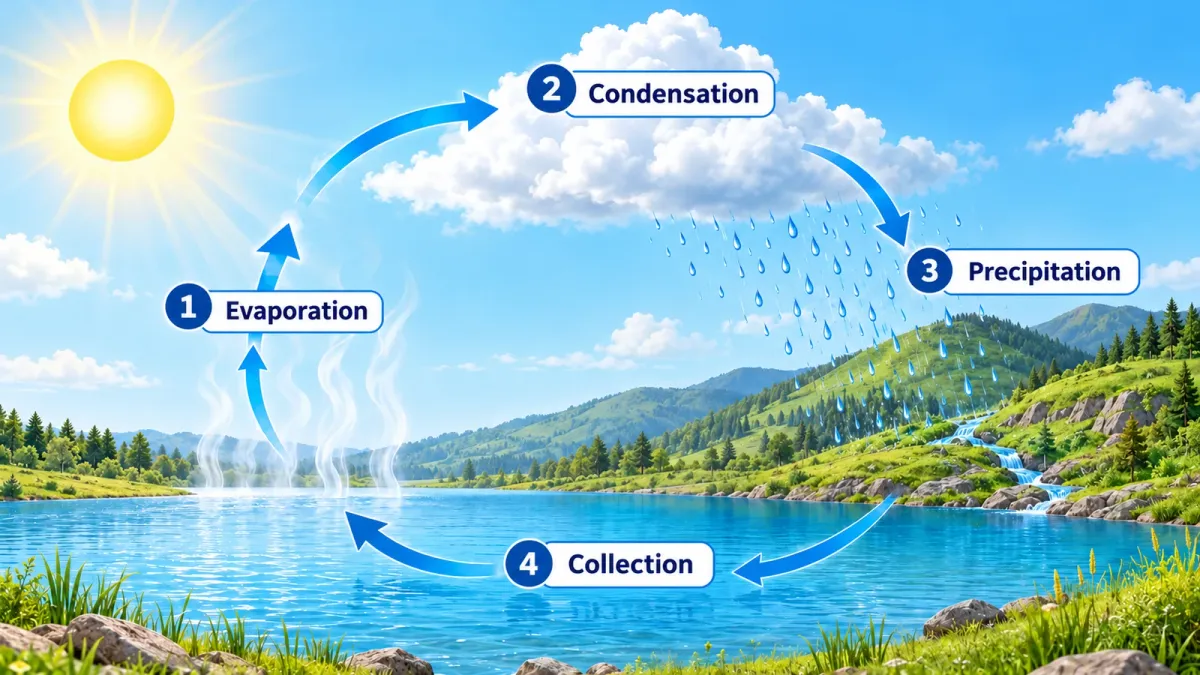
This illustration was generated for the guide. It shows a basic cycle; processes such as infiltration and transpiration can be added if the chapter covers them. Check every arrow and label. A polished diagram can still contain a scientific error.
Example: flashcards you can attempt first
A useful practice card leaves room for your own attempt. Ask for the question and have ChatGPT wait before revealing the answer.
In this conversation, /flashcards means make question-and-answer cards from the supplied material.
/flashcards
Create 6 cards based on the water-cycle passage above.
Test one idea per card. Include a question about the sequence and a question asking me to explain condensation.
Show only the first question and wait for my answer. Give brief feedback grounded in the passage before moving to the next question.
If my answer is incomplete, offer a hint before revealing the answer.
One possible question is: “What happens when water vapor cools and forms droplets in clouds?” Check that the expected answer follows your source’s definition. Ask for a rewrite if a card is ambiguous.
Example: a practice test with feedback
In this conversation, /examme means build an original practice test from my sources.
/examme
Use the water-cycle passage in this chat. Level: sixth grade.
Goals: explain evaporation and condensation, put the stages in order, and explain the sun’s role.
Create 4 questions: two open questions, one sequence question and one application question.
Ask one at a time. Do not reveal answers in advance.
After each attempt, explain what is accurate and what is missing, pointing to the relevant source sentence.
At the end, make a short error log and one follow-up exercise for each topic I missed.
Do not guess what will appear on my actual exam.
Attach the official syllabus or rubric when you have one. ChatGPT’s assessment is practice feedback and may be wrong; your teacher or instructor determines the actual grade. OpenAI also describes building exam preparation around course materials and reviewing generated questions and answers against those sources. OpenAI’s exam study-system example.
The 100-shortcut study library
Copy each code together with its description to define it in your conversation. Interactive games require a compatible interface; ask for a chat-based version when needed.
Five shortcuts to start with (5)
| Code | What to request |
|---|---|
/generatehandwrittenimage | A handwritten-style notes image; check the rendered text. |
/visualizelearning | A visual explanation of a concept in your supplied material. |
/makestickynotes | Short sticky notes with one idea per note. |
/flashcards | Question-and-answer cards, optionally practiced one at a time. |
/examme | A practice test based on your material and learning goals. |
Visual notes (25)
| Code | What to request |
|---|---|
/mindmapimage | A mind-map image using the source concepts. |
/infographicnotes | An infographic of the chapter’s main points. |
/doodlenotes | Sketchnotes with small drawings and short labels. |
/flowchartimage | A process flowchart, including decision points where relevant. |
/conceptmap | A concept map with labeled relationships. |
/venndiagram | A Venn diagram comparing two topics. |
/labeleddiagram | A labeled diagram of parts or components. |
/anatomydiagram | An anatomy diagram based on course material; verify terminology. |
/cyclediagram | A cycle diagram with clear directional arrows. |
/posternotes | A revision poster that can be formatted for printing. |
/comicstrip | A concept comic; label invented narrative as illustration. |
/storyboardit | A storyboard of events or process stages. |
/illustratedstory | An illustrated memory story that separates fiction from facts. |
/timelinegraphic | A timeline using the dates in your source. |
/mapit | A geography or history map; verify locations. |
/periodicstyle | A periodic-table-style layout with a grouping key. |
/iconsummary | An icon summary with explanatory labels. |
/cheatsheetimage | A study-sheet image for use within course rules. |
/whiteboardexplain | A whiteboard-style visual explanation. |
/colorcodenotes | Color-coded notes with a consistent legend. |
/diagramthis | Choose a suitable diagram type and briefly explain why. |
/visualsummary | An annotated visual chapter summary. |
/sketchconcept | A labeled sketch explaining a concept. |
/graphit | A graph of supplied data only, with units and labeled axes. |
/processposter | A step-by-step process poster. |
Memory images (7)
| Code | What to request |
|---|---|
/memorypalaceimage | A memory-palace scene linking locations to items. |
/mnemonicart | An illustration of your chosen mnemonic. |
/picturemnemonics | A picture mnemonic for each term, with the connection explained. |
/visualvocab | Vocabulary cards with an image and definition. |
/emojisummary | An emoji summary with a text key. |
/memoryhooks | A short image association for each fact to remember. |
/rebus | A picture-and-word rebus for concept practice. |
Games and interactive practice (20)
| Code | What to request |
|---|---|
/quizgame | A clickable quiz where supported, otherwise a chat quiz. |
/flashcardapp | Flip cards in a supported interface, otherwise chat Q&A. |
/matchinggame | Match terms to definitions. |
/memorygame | A pairs game using chapter concepts. |
/millionaire | A four-option quiz with optional hints. |
/jeopardy | A question board organized by topic and difficulty. |
/hangmanterms | A letter-guessing game using study terms. |
/crosswordit | A concept crossword with clues and a separate solution. |
/wordsearch | A chapter-term word search; check that every word is present. |
/fillblankapp | Fill-in-the-blank practice with feedback. |
/timedquiz | A timed quiz; use an external timer when needed. |
/progresstracker | A progress table updated from practice results. |
/studytimer | Plan study intervals; a running timer needs a suitable tool. |
/conceptsim | A simple concept simulation with assumptions and limits. |
/interactivetimeline | A clickable timeline where supported, otherwise a detailed chat list. |
/labeltheimage | An exercise matching labels to image parts. |
/sortinggame | Sort examples into categories and explain the answers. |
/decisiontree | A decision tree showing questions and branches. |
/formulaplayground | Explore formula variables while checking units and valid ranges. |
/conceptquiz | A quiz that adapts subsequent questions to your answers. |
Study guides and planning (10)
| Code | What to request |
|---|---|
/studyguidemaker | A unit guide with concepts, examples and review questions. |
/revisiontimetable | A revision timetable based on your available time and topics. |
/examcountdown | A daily plan up to your stated exam date. |
/topicchecklist | A topic checklist informed by practice results. |
/notetemplate | A notes template suited to the subject and lesson type. |
/lecturenotes | Organize a transcript or lecture notes into a structured summary. |
/gapfinder | Identify material gaps against your supplied learning objectives. |
/formulacard | A formula sheet with variable definitions and units. |
/definitionwall | A glossary of terms and definitions from the sources. |
/examrubric | Apply a supplied rubric, or propose clearly labeled practice criteria. |
Exam practice and feedback (9)
| Code | What to request |
|---|---|
/pastpaper | Create an original mock paper using a supplied format. |
/markmypaper | Formative feedback and practice scores against a rubric. |
/modelanswer | A model answer with reasoning linked to the material. |
/examplequestions | Practice questions on your chosen topics. |
/oralexam | An oral-style exam in text, or voice where available. |
/essaymarker | Feedback on an essay’s argument, structure and evidence. |
/mistakelog | An error log with explanations and follow-up exercises. |
/predictpaper | Prioritize revision from official material; this does not predict an exam. |
/timedessay | An essay task with your chosen time limit; use an external timer if needed. |
Understanding and explanation (9)
| Code | What to request |
|---|---|
/explainwithpictures | Explain a concept using pictures and labels. |
/realexample | A concrete example; identify invented examples as illustrations. |
/commonwrong | Common misconceptions and corrections grounded in the source. |
/connectit | Connect your stated prior knowledge to the new topic. |
/walkmethrough | A step-by-step explanation paced to your understanding. |
/workedexample | A worked example explaining each step. |
/twinexample | A worked example followed by a similar problem to attempt. |
/whatsonthetest | Map exam scope using the official guidance you provide. |
/storyexplain | Explain through a story, distinguishing illustration from fact. |
Subject-specific shortcuts (15)
| Code | What to request |
|---|---|
/solveandshow | Solve a math problem with steps and a result check. |
/checkmymath | Check your working and identify the step containing an error. |
/practiceset | A practice set with separate answers so you can attempt it first. |
/provethis | A proof with stated assumptions and explained steps. |
/balanceit | Balance a chemical equation and check atom conservation. |
/labreport | Structure a lab report from your data without inventing results. |
/conjugatetable | A verb-conjugation table for the requested language and tense. |
/languagedrill | Language drills with corrections and brief explanations. |
/translategloss | Translation with contextual word and phrase explanations. |
/readingguide | Reading-comprehension questions on your supplied text. |
/quotebank | Exact quotations from supplied text, with locations where known. |
/essayplanner | An essay plan with a thesis, structure and source evidence. |
/sourceanalysis | Analyze a historical source’s authorship, context and evidence. |
/grammarfix | Correct grammar and explain the relevant rule. |
/speechpractice | Rehearse a speech with feedback on wording and structure. |
Choose a starting point
Use /lecturenotes if your notes need organizing. Define /conceptmap when the relationships are unclear. Move to /flashcards or /examme when you are ready to answer without looking. After practice, /mistakelog can help you return to the topics you missed.
Frequently asked questions
Do I need a paid ChatGPT plan?
Text requests can be written without image tools or a game interface. File access, images, interactive outputs and usage limits vary by account and availability. Check the tools shown in your interface; this list does not promise every output on every plan.
Why does typing a code alone not work?
The conversation needs the code’s definition. Paste its library row again with your study material. You can also write the request in ordinary language.
Can I get a clickable game or a timer?
Request an interactive output in an interface that can display or run it. A response containing code is not necessarily a game you can play inside the chat. Use an external clock if no functioning timer is available. Save and update your own progress table.
Can these shortcuts predict my exam?
No. Here, /predictpaper and /whatsonthetest mean organizing revision around official exam scope you supply. Without a syllabus or instructions, ask what information is missing before planning practice.
How should I check an AI-generated study image?
Compare labels, arrows and numbers with the source. Check process direction and units in scientific diagrams, and locations in maps. If image text is garbled, ask for fewer labels or an editable text version. The official ChatGPT image-generation guide.
Start with one chapter
Copy the flashcard example, replace the water-cycle passage with your own material and attempt the first question before revealing its answer. For more reusable requests, see the ChatGPT command library.
Keep it for later
Take the guide with you
Save the complete guide to read and annotate offline, or print a copy to keep beside you while you work.
Keep reading

GuideAI
100 useful ChatGPT commands
A practical shortcut library for writing, research, learning, marketing, and productivity, with one-click copying.

GuideAI
200 ChatGPT image and video shortcuts: my workflow
200 short requests for portraits, products, ads, branding and video. My guide covers defining shortcuts, using references and connecting Higgsfield.

GuideAI
ChatGPT Deep Research: A Practical Guide to Research with Sources
Frame a research request, compare products, plan a trip and verify the evidence. Includes four prompts to adapt and a reusable research template.