
AI
52 AI tools in 2026: how to choose the ones for your work
Map 52 AI tools, capabilities and workflows by task, with a selection prompt, a practical trial and language and availability checks.
To choose an AI tool, start with a recurring task and test whether the assistant you already use can complete it. Add a specialist when a trial reveals a specific gap, such as video editing, workplace search or application tracking. This guide maps 52 options and gives you a practical comparison method and a copyable selection prompt.
Updated and checked: November 9, 2026.
Start with one task already on your desk
This guide is for independent professionals, creators, team members and people starting to use AI. By the end, you can choose a tool for a defined task and design a trial that helps you decide whether to keep it.
Write a sentence such as: "Every Thursday, I turn an event recap into a newsletter and a post." Prepare a sample you have permission to upload, define the deliverable and choose one tool you can already access. If you have no general assistant, pick one candidate from the first group and try the task there.
Set a monthly budget and a time limit for the trial. Include corrections, moving material between tools and fact-checking. A fast first draft can cost more time than your current process if it needs extensive repairs.
Narrow the list before signing up
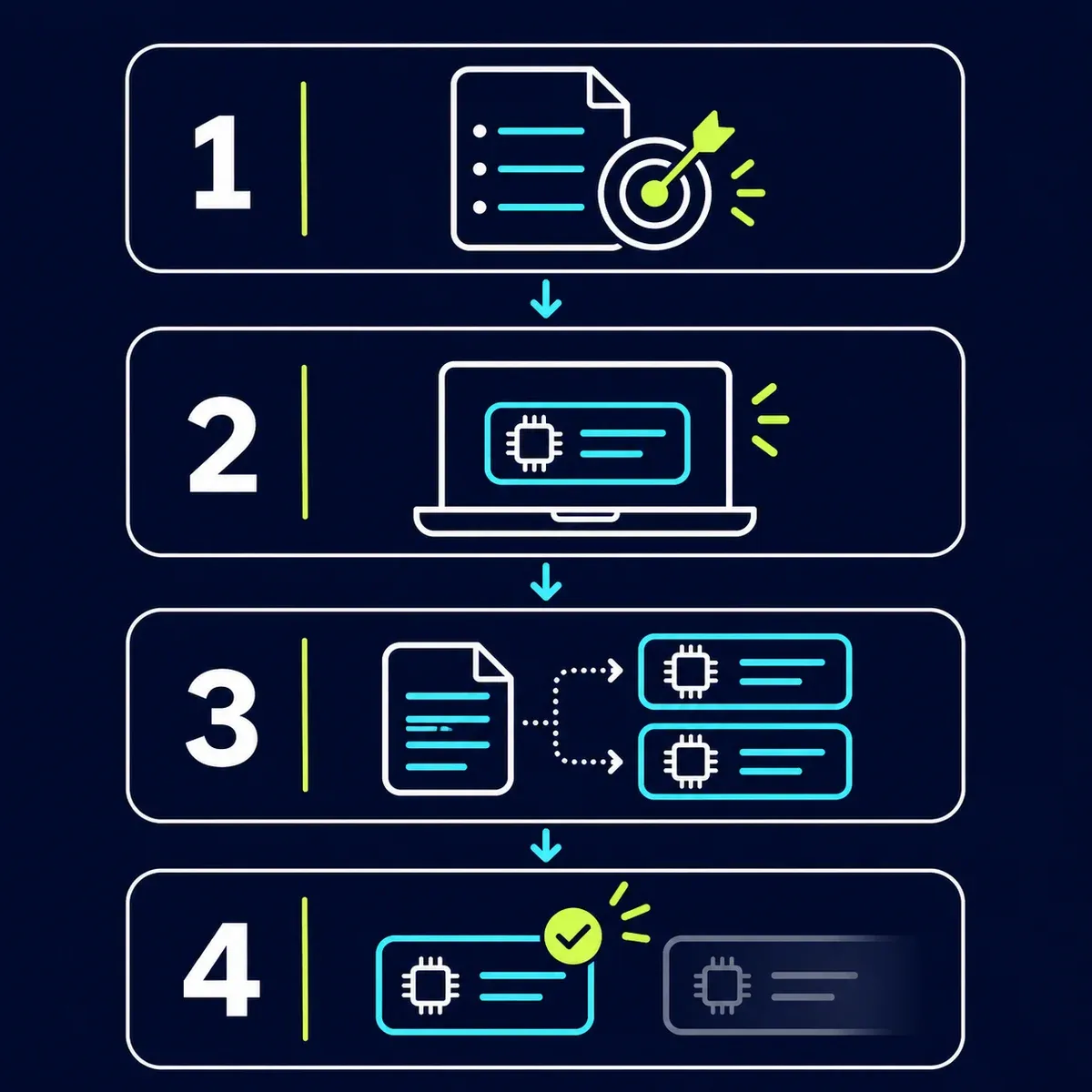
- Define a result you can inspect: a factually correct email, an editable deck or a clip with accurate captions.
- Check the tools already used at work. Material in Google, Microsoft or Notion is a reason to examine available capabilities there before moving it to another system.
- If a gap remains, select one specialist. Compare it using the same input and requirements.
- After several real tasks, decide whether to keep, replace or cancel it. An extra subscription should justify its cost and upkeep.
| What you need to finish | Starting point to test | When a specialist may help |
|---|---|---|
| Writing and document reasoning | Your existing general assistant | When a required source or workflow remains unsupported |
| Studying a defined source collection | Gemini Notebook or an existing tool with attached sources | When you repeatedly work from the same library |
| A post or presentation | An available design capability, such as Canva AI or Gamma | When editing, sharing or export does not fit the team |
| Turning video into clips | Opus Clip, Descript or CapCut, depending on the edit | When recorded material creates a recurring editing bottleneck |
| A website or software project | Lovable for a prototype; an existing coding environment for code | When you need file control, testing and maintenance |
| A workflow across business systems | A sample report without a live connection | After checking the need, permissions and action review |
The 52 options and what each adds
Numbers follow the source’s quick-reference list; groups here follow the work to be done. A capability inside ChatGPT or Claude may cover a need without another product. A workflow such as "Shopify plus Claude" needs data or a connection, while Fiverr is a marketplace for people. Check the type before comparing prices.
General assistants and work environments
| # | Tool or capability | Type | When to try it and what to test |
|---|---|---|---|
| 1 | ChatGPT | General assistant | Draft and edit text; turn notes into an email while preserving the facts. |
| 2 | Claude | General assistant | Work through an argument or document; ask for a critique of one draft. |
| 3 | Gemini | General assistant | Explore an assistant in the Google ecosystem; test an approved document before connecting accounts. |
| 4 | Grok | General assistant | Explore web and X discussions; distinguish people’s reactions from verified facts. |
| 49 | Microsoft Copilot | Product family | Work with Microsoft documents; check which Copilot product and license your account has. |
Agents for tasks and files
| # | Tool or capability | Type | When to try it and what to test |
|---|---|---|---|
| 6 | Codex | Agent tool | Work on a project and its files; start with a bounded task and inspect the output. |
| 7 | Claude Cowork | Claude capability | Turn work files into a deliverable; try a summary from an authorized sample folder. |
| 8 | Genspark | Agent workspace | Create a document or deck from a brief; check export access on your plan. |
| 9 | Manus | Task agent | Try a task with several steps; define the deliverable and permission boundaries first. |
| 48 | Meta Muse | Personal agent | Try a bounded task in the US; check availability and permissions for every connection. |
Building websites and software
| # | Tool or capability | Type | When to try it and what to test |
|---|---|---|---|
| 10 | Lovable | App builder | Build a conversational prototype; try a signup screen with sample data and test it. |
| 11 | Claude Code | Coding agent | Work in a codebase; request one fix and an explanation of its validation. |
| 12 | Cursor | Coding environment | Edit code with an agent; try a small change in a recoverable project. |
Images, design and presentations
| # | Tool or capability | Type | When to try it and what to test |
|---|---|---|---|
| 13 | Higgsfield | Media studio | Create an image or video from a brief; test one concept for consistency. |
| 14 | ChatGPT's image generator | ChatGPT capability | Create or edit an image in chat; request one focused change and name what must stay. |
| 15 | Nano Banana | Gemini image capability | Generate and edit images in Gemini; start with a reference you have permission to use. |
| 16 | HeyGen | Avatar video | Explore a virtual-presenter video; try a short script and check pronunciation and target language. |
| 17 | Synthesia | Training video | Produce a presenter-led explainer; review script, captions and pronunciation before sharing. |
| 18 | Claude Design | Claude design capability | Create a design or prototype in chat; check the current Artifacts entry point. |
| 19 | Canva AI | Design tool | Turn a brief into an editable design; try a post and manually revise its text. |
| 27 | Artlist | Media assets and AI | Combine media assets and generation tools; check licensing for the project and distribution channel. |
| 30 | Gamma | Presentations | Turn an outline into a deck; check the story, figures and export before delivery. |
Editing, voice and music
| # | Tool or capability | Type | When to try it and what to test |
|---|---|---|---|
| 21 | Opus Clip | Video clipping | Find clips in a long video; verify that each cut preserves its context. |
| 23 | Descript | Audio/video editor | Edit video through its transcript; remove a sample sentence and inspect the cut. |
| 24 | CapCut | Video editor | Edit a clip and add captions; manually check language, framing and export. |
| 25 | Fish Audio | Voice generation | Turn a script into narration; use an authorized voice and check language support. |
| 26 | Suno | Music generation | Explore a musical idea; check your plan’s usage rights before commercial release. |
Dictation, meetings and knowledge
| # | Tool or capability | Type | When to try it and what to test |
|---|---|---|---|
| 28 | Wispr Flow | Voice dictation | Dictate into a text field; explicitly select Hebrew when needed and check names and numbers. |
| 29 | Granola | Meeting notes | Produce meeting notes and actions; notify participants and follow organizational rules. |
| 31 | Notion | Knowledge workspace | Organize documents and tasks; start with one project page and clear sources. |
| 32 | Perplexity | Sourced research | Research a question and open its sources; check that each supports the linked claim. |
| 33 | Gemini Notebook | Source notebook | Work from a source collection; try questions grounded in the material you added. |
| 51 | Dropbox Dash | Workplace search | Find material across connected apps; check the source, version and permissions. |
Marketing, sales and business operations
| # | Tool or capability | Type | When to try it and what to test |
|---|---|---|---|
| 5 | Cytd | AI visibility service | Monitor brand mentions in AI answers; start with repeatable customer questions, without assuming guaranteed rankings. |
| 20 | Meta Ads in Claude | Connected workflow | Analyze an ads report in Claude; start with CSV or a connector with reviewed permissions. |
| 22 | Manychat | Messaging automation | Build an Instagram response flow; check account permissions and use a test account. |
| 34 | Kit | Creator email platform | Manage a newsletter; prepare and review a draft before sending to an authorized list. |
| 35 | Vibe Prospecting | Sales research | Research companies and contacts; verify details before outreach and follow usage rules. |
| 36 | Mercury | Business financial service | Explore finance operations for an eligible company; verify business and founder eligibility first. |
| 37 | GoHighLevel | Sales/marketing platform | Organize leads and follow-up; test one workflow with fictional records. |
| 38 | Shopify plus Claude | Connected commerce workflow | Work on store data in Claude; start with an export stripped of personal data. |
| 50 | HubSpot | CRM and AI platform | Use customer data in team workflows; start by summarizing a sample record. |
Job searching and text checking
| # | Tool or capability | Type | When to try it and what to test |
|---|---|---|---|
| 39 | Teal | Job-search organizer | Track applications and resumes; start with one job and record which resume version you sent. |
| 40 | Big Interview | Interview practice | Practice a recorded answer; review examples, structure and clarity instead of memorizing it. |
| 41 | Originality AI | Content checking | Get a signal about text; AI detection is probabilistic and proves neither originality nor misconduct. |
Skills, services and specialist workflows
| # | Tool or capability | Type | When to try it and what to test |
|---|---|---|---|
| 42 | Claude Finance Agents | Agent/skill ecosystem | Assist professional financial research; check data licensing and qualified review. |
| 43 | Claude Legal Skills | Legal plugin/skills | Prepare contract review points; configure jurisdiction and have a lawyer check conclusions. |
| 44 | AI Marketing Skills | Skills collection | Apply reusable marketing instructions; read one skill before installing or running it. |
| 45 | Apple Health in ChatGPT | Health-data connection | Bring context to health conversations; access and Apple Health connections depend on eligibility and device. |
| 46 | Superpower | Health service | Explore US testing and follow-up services; check service area and keep care with a clinician. |
| 47 | Claude Travel Agent | Claude workflow | Keep travel preferences in a project; compare options and verify availability before booking. |
| 52 | Fiverr | Freelance marketplace | Find a specialist for a task; define the brief, samples and deliverable. |
Copyable prompt: choose tools around your task
Paste this into your general assistant and replace the bracketed fields. Attach this guide or paste the relevant groups. Supply a task, an approved sample, existing tools and a budget. The expected output is a short trial you can run and assess.
Help me choose an AI tool for a defined task.

My recurring task: [describe the input and required deliverable].
Frequency: [times per week or month].
Tools and accounts I already have: [list, including plans if known].
Device, country and working language: [details].
Maximum additional monthly budget: [amount and currency].
Information I must not upload or share: [restrictions].
Approved sample material: [paste or attach].
Success criteria: [facts to preserve, format, editing or export needs].

If a missing detail prevents a useful choice, ask me first. Start with a tool I already have.
Suggest no more than two options and explain what each adds to this task.
Distinguish a standalone product, a built-in capability, a skill and an external service connection.
Do not assume you can access my accounts. Without a connection, suggest manual input or a sample file.
Verify availability, permissions, pricing and export against official sources if you have web access.
If you cannot verify a detail, mark it for checking rather than inventing a value.
Give me a trial using the same input for each option, review criteria and a stopping rule.
Prepare a table: option | prerequisites | trial steps | what I will check | verified cost or cost to check.
Prepare work for review only. Do not send messages, change records or buy a subscription.
Worked example: an event recap becomes a newsletter and a post
Fictional practice scenario: a small Tel Aviv business runs a phone photography workshop on Thursday, November 19, at 6 p.m. It lasts 90 minutes and costs NIS 120. This is not a real event. The requested outputs are a short newsletter and a post, without invented registration links or seat counts.
Start in the general assistant you already have and request both drafts from the same facts. If a design is needed, move approved copy into your existing design tool. Kit or Manychat becomes relevant when you need email delivery or messaging automation; drafting copy does not connect either service to your account.
Illustrative output to check: "Join a phone photography workshop in Tel Aviv on Thursday, November 19, at 6 p.m. The workshop lasts 90 minutes and costs NIS 120." Verify that price, date and duration match the input. If the draft adds "Only three seats left," it fails the factual check.
| Check | How to assess it |
|---|---|
| Fidelity to the input | Compare every date, amount and name with the source |
| Usability | Open the file or draft in the environment where you actually work |
| Total working time | Include generation, corrections, transfer and review |
| Cost | Check monthly cost, annual commitments, allowances and connector charges |
| Decision | Keep an extra tool only if it solves a recurring gap in the trial |
Check language support and availability in your country
For Hebrew dictation in Wispr Flow, explicitly select Hebrew. Current documentation says automatic recognition cannot identify Hebrew from speech alone. For an initial test, select Hebrew by itself and check names, numbers and a sentence containing an English product name. Official language instructions.
Gemini Notebook lists Hebrew among browser output languages, but different features may support different languages. Test a short source and the specific output you need, including audio if relevant. Google’s output language help.
ChatGPT Health is listed for US adults aged 18 and older on the personal plans named on its official page, on web and iOS. Meta lists Muse as rolling out in the US. For readers in Israel or another unsupported location, use an available assistant for a bounded draft with material you choose to share; do not assume a health-data or external-account connection exists. Health, Meta’s Muse announcement.
Superpower lists US service areas. In Israel, a practical alternative is organizing results and questions for your own clinical team. Mercury supports US companies subject to eligibility and residence/activity restrictions; Israeli citizenship alone does not establish eligibility. For local operations, start with reports from your existing financial system without assuming an AI connection is included. Superpower availability, Mercury country restrictions.
Check connectors, skills and permissions before assigning work
A conversation about Meta ads or a Shopify store can begin with an uploaded file. Live access requires an available connector, an authorized account and sometimes another plan or provider. Check who operates it and what it may read and change. Claude inherits the user’s permissions in the connected service. Official connector guide.
A skill contains instructions and may include code or files. Read it and check its origin, license and actions before running it. Anthropic’s legal plugin requires jurisdiction and organizational playbook configuration and attorney review; Finance workflows assist professional research. Health tools can help organize information and questions, while treatment decisions stay with a clinician. Legal plugin and limitations, Claude’s finance ecosystem, Health.
For media, check permission to use someone’s likeness or voice and a license covering your intended distribution. Artlist distinguishes catalog assets from AI outputs and defines permitted uses through its license. Artlist licensing.
Questions that come up during selection
Do I need several paid general assistants?
Start with one you actually use. Test another on the same task when you can name a remaining gap. Compare the limitation you encountered, the output and correction time, then decide whether two subscriptions serve a purpose.
Does an Originality AI score prove how text was written?
No. The vendor describes detection as probabilistic and says to consider other evidence. When editing, check facts, sources, wording and work history. Originality.ai’s explanation.
What if a button or capability is missing?
Check the plan, device, country and organizational policy in the product’s help center. Do not buy a subscription based only on a name in a list. For example, Claude Design is available through conversations and Artifacts; its old standalone entry point closes on December 14, 2026, according to current help documentation. Claude Design instructions.
Related guides
Choose one task waiting on your desk, copy the selection prompt and test the tool you can already access.
List source: Maverick AI’s The AI Tools I Actually Use, including its 52-option PDF. The grouping, selection method and practice examples here are NexAI’s. The source author’s personal usage descriptions are not evidence of testing by Gilad.
Keep it for later
Take the guide with you
Save the complete guide to read and annotate offline, or print a copy to keep beside you while you work.
Keep reading

GuideAI
100 useful ChatGPT commands
A practical shortcut library for writing, research, learning, marketing, and productivity, with one-click copying.

GuideAI
AI marketing skills: a practical guide for Claude, ChatGPT and Codex
My guide to the Marketing Skills library: choose skills, install them in Claude and OpenAI environments, and build a marketing workflow with 9 prompts and factual checks.
GuideAI
ChatGPT Deep Research: A Practical Guide to Research with Sources
Frame a research request, compare products, plan a trip and verify the evidence. Includes four prompts to adapt and a reusable research template.